Showing posts with label Huawei MA5616. Show all posts

Tuesday, November 14, 2017

Huawei DSLAM MA5616 Power Distribution Principle and Working Principles

Power Distribution Principle

Huawei MA5616 can be powered by a DC or AC power source through a DC or AC power board. The power board outputs -48 V DC, +3.3 V DC, and +12 V DC power to the backplane. Then the backplane provides the -48 V DC and +3.3 V DC power for the service board and control board, and provides the +12 V DC power for the fan monitoring board.

Power distribution principle of the MA5616 chassis(DC-powered H831PDIA /H832PDIA /H832PDVA/ H832PDVAA) 


Power distribution principle of the MA5616 chassis (AC-powered by H831PAIA/H831PAIC) 


Power distribution principle of the MA5616 chassis (AC-powered with power backup by H831PAIB) 


Working Principles

Huawei MA5616 supports GPON, 10G GPON or GE upstream CCUE transmission by using its control board and provides broadband and narrowband access services by using different service boards.

Working principles of the MA5616 chassis 
The working principles of Huawei DSLAM MA5616 chassis are as follows:
  • The control board transmits services upstream and subtends device through subboards and manages service boards.
  • The power board outputs DC power to the backplane and then the backplane transmits the power to the fan tray, service boards, and control board.
  • The broadband or narrowband service board is connected to a user-side device by using a subscriber cable, and then the control board puts the user-side device through to the IP network. In this way, broadband or narrowband access service is provisioned to the user-side device.
  • The fan monitoring board monitors the fan tray and transmits the monitoring signal to the control board through the backplane.

Tuesday, September 12, 2017

Do you know Huawei small-size DSLAM MA5616 and the Highlights? (1)

Huawei DSLAM SmartAX MA5616 Multi-service Access Module (MA5616 for short) is a 2-U high and 19-inch wide board-inserted device. It provides four service slots for flexible board configurations.
The MA5616 applies in fiber to the building (FTTB) and fiber to the curb (FTTC) scenarios. It can also function as a mini-digital subscriber line access multiplexer (DSLAM) or multiservice access node (MSAN). The MA5616 can be installed in corridors or cabinets (indoor or outdoor).
Each MA5616 provides user-to-network interfaces (UNIs), such as ADSL2+, VDSL2, SHDSL, POTS, FE, P2P, ISDN, or combo ports, and two network-to-network interfaces (NNIs) that support autonegotiation among GPON, EPON

Product Display

The following figure shows the appearance of the MA5616 equipped with a CCUE control board and PAIC power board.


CCUE control board


Hardware Structure

Commissioning serial port/Environment monitoring port

For the CON port: supports local and remote maintenance, which allows users to configure the MA5616 using software, such as HyperTerminal, through CLI. The default baud rate is 9600 bit/s.
For the ESC port: connects to an environment monitoring unit (EMU), which sends monitored environment monitoring parameters to the MA5616.

Uplink optical port

Supports auto-negotiation among GPON, EPON, and GE. Provides GPON, EPON, and GE upstream transmission or GE cascading. When this uplink optical port is used as a GE port, it is an alternative to the GE electrical (RJ45) port.

Maintenance network port
A 100M Base-T commissioning network port, which is a front-access-cabled FE port and supports 100 Mbit/s full-duplex in auto-negotiation mode.

Clock port
Outputs 2 MHz clock pulse signals.

Environment parameter monitoring port
Can be connected to a sensor to monitor environment parameters.

GE electrical port
Supports 1000 Mbit/s full-duplex upstream transmission or cascading in auto-negotiation mode. It is an alternative to the uplink optical (SFP) port.


Do you know Huawei small-size DSLAM MA5616 and the Highlights? (2)

Huawei MA5616 Highlights

High-Speed Vectoring
The MA5616 supports vectoring, which is used to increase VDSL2 line rates. With this technology, users can access the Internet at a higher rate and experience more and better VDSL2 services.

Crosstalk cancellation in the downstream direction


Crosstalk cancellation in the upstream direction


IPv6

 The IPv6 feature relieves IP address shortages and is simple to deploy, facilitating smooth service migration from IPv4 networks to IPv6 networks. In addition, IPv6 networks are compatible with IPv4 networks.

Combo Board Design

The combo board design reduces wiring space on the main distribution frame (MDF) and improves deployment efficiency, thereby reducing carriers' construction and maintenance costs

Comprehensive QoS
  • User port-based rate limitation in both downstream and upstream directions
  • Traffic shaping for port-level queue groups
  • Weighted random early detection (WRED) profile and the binding of a WRED profile to a queue
  • Access control list (ACL)-based priority marking
  • Mapping downstream or upstream services to different priority queues for scheduling based on priorities
  • Three scheduling modes: priority queuing (PQ), weighted round robin (WRR), and PQ+WRR
High Efficiency Maintenance and Management

Is plug and play and supports service pre-deployment.


MA 5616 Supports remote fault locating, troubleshooting, and batch upgrades.

Carrier-Class Reliability Design

  • Complies with carrier-class reliability specifications.
  • Passes the electrostatic discharge (ESD) test.
  • Provides surge protection and anti-interference functions.
  • Protects user ports and power ports.
  • Uses an anticorrosion design and fewer lines routed across the surface of a board to achieve a proper heat dissipation effect (producing a temperature difference to prevent condensation).

Energy Conservation

The power-conservation design ensures the lowest power consumption and noises and the optimal heat dissipation, thereby reducing environment pollution and operation costs.


Friday, September 8, 2017

Do you know the features of Huawei DSLAM MA5616?

10G GPON Upstream Transmission

  • 10G GPON provides a higher bandwidth to meet service requirements.
  • The 10G GPON transmission complies with ITU-T Recommendation G.987 and ITU-T Recommendation G.988, and provides asymmetric transmission rates of 2.5 Gbit/s in the upstream direction and 10 Gbit/s in the downstream direction.
  • 10G GPON networks can coexist with the current GPON networks to fully use the existing optical distribution network (ODN) resources.

Vectoring Broadband Service Speedup

Huawei MA5616 supports the vectoring technology to increase the very-high-speed digital subscriber line 2 (VDSL2) line rate.
VDSL2 is a mainstream mode for last kilometer access and shows increasing importance in bandwidth usage. VDSL2 uses high frequency bands and therefore the inter-line crosstalk has an evident impact on line quality. The bandwidth in multi-pair access scenario is much lower than the bandwidth in single-pair access scenario. Crosstalk becomes a major factor affecting the VDSL2 performance.
The MA5616 supports the vectoring technology, which uses vectoring groups to jointly transmit signals in the downstream direction and receive signals in the upstream direction of a VDSL2 line. This function of the MA5616 helps cancel the far-end crosstalk (FEXT) and improve VDSL2 line performance.
The vectoring function brings the following values for carriers:
  • Increases the bandwidth over a single cable within 500 m by 50% to 90%, reaching 95% of the theoretical value (without crosstalk).
  • After rate increasing, carriers can provide higher rates and more types of services for users, such as high-definition video.
NOTE:
Only when the system uses the CCUE control board, the MA5616 supports vectoring broadband service speedup.

Flexible Configurations

The MA5616 supports concurrent working of multiple types of service boards. Numbers of various ports are configured flexibly according to actual requirements, increasing the loading rate and meeting diversified customer demands. For details about the flexible configuration supported by the MA5616
Combo Boards and P2P Board
The MA5616 has a combo board design for supporting a high subscriber density. Combo boards save carriers' construction expenditure, require less deployment space, wiring workload, and time occupancy of the main distribution frame (MDF). Briefly, combo boards reduce carriers' maintenance costs.
  • The CALE board has a 32-port built-in splitter and supports service access of 32 asymmetric digital subscriber line 2 plus ADSL2+ ports and 32 plain old telephone service (POTS) ports.
  • The CVLC board has a 32-port built-in splitter and supports service access of 32 VDSL2 ports and 32 POTS ports.
The MA5616 provides the following point-to-point (P2P) boards to meet the requirements of P2P access for enterprises and VIP users.
  • The EIUD board provides four GE (optical or electrical) ports and four FE optical ports.

Various Services

  • Supports Internet Group Management Protocol (IGMP) v2 and v3 to provide IPTV, high definition TV, and video conference services.
  • Supports basic voice services such as call, fax, and modem services, and supplementary voice services such as three-way calling, call waiting, call transfer, calling line identification presentation, and calling number restriction services.

IPv6

  • Supports IPv6. Compared with IPv4, IPv6 features simplified packet header format, sufficient IP addresses, hierarchical IP address structure, flexible extension header, and enhanced neighbor discovery mechanism.
  • Supports IPv6 address management and allocation, IPv6 routing, quality of service (QoS) and security, Layer 2 transparent transmission, and multicast services.

One-Site Deployment and Plug-and-Play

  • Is free of software commissioning on site.
  • Supports offline deployment and plug-and-play when the device transmits services upstream through a passive optical network (PON) port.
  • Automatically obtains configuration data from the iManager U2000 network management system (U2000) and reports its status to the U2000 after going online. The configuration data automatically takes effect.

Zero Touch Routine Maintenance

  • Supports fault location through an xPoA command.
  • Supports remote fault location and troubleshooting.
  • Supports remote acceptance.
  • Supports remote upgrade and patch installation.

Carrier-Class Reliability Design

  • Complies with carrier-class reliability specifications.
  • Passes the electrostatic discharge (ESD) test.
  • Be able to start at a -25°C temperature and to work properly for extended periods of time at a temperature as low as -40°C.
  • Be able to work properly at a temperature as high as 65°C (temperature at the air intake vent of the cabinet) for extended periods of time.
  • Provides surge protection and anti-interference functions.
  • Supports user port protection as follows:
    • Digital subscriber line (DSL)/POTS/integrated services digital network (ISDN) ports: complying with K21, 4 kV in common mode and in differential mode
  • Supports power protection as follows:
    • DC power: 5 kV in common mode and 3 kV in differential mode
    • AC power: 6 kV
  • Uses an anticorrosion design, reduces the wires routed across the surface of the board, and optimizes the heat design by producing a temperature difference to prevent condensation.

Tuesday, July 4, 2017

How to Query Traffic of a Port on Huawei MA5616?

How to Query Traffic of a Port on Huawei MA5616?


On current ONUs, you can query packet statistics of a port but cannot directly query traffic of a port. To obtain traffic of a port, you can collect the number of frames received or transmitted by the port in a period of time as follows:
  1. Query the number of frames received or transmitted by a port at two different time points by running the following commands for different scenarios:
    • On a GPON uplink port, run the interface gponnni command to enter the GPONNNI mode, and then run the display gpon-port statistics command to query the number of frames received or transmitted by a port.
    • On other ports, run the display interface [ interface-type [ interface-number ] ] command to query the number of received or transmitted by the ports.
  2. Use the following formula to calculate the number of frames received or transmitted by a port between two time points: Number of frames collected the second time - Number of frames collected the first time.
  3. Use the following formula to calculate the traffic on the port: Number of frames x Bytes per frame.
For example, the number of frames on a port are collected at two time points within 30s, and the number of frames between the two time points is 85734 (786687061 - 786601327). Assume that the length of a frame is about 1500 bytes. The traffic on the port within 30s is 981 Mbits (85734 x 1500 x 8= 1,028,808,000 bits), or 122.6 Mbytes.

Sunday, March 26, 2017

Huawei FTTx Leased Line Solution

Copper Access for Business

EDTB board in Huawei OLT will be adopted, which can support 16 E1 ports and 16 G.SHDSL ports concurrently in one board;

100% inherit the legacy service, don’t need change customer premise equipment;

Application Scenarios:

EDTB is mainly applied for extending E1 coverage by transferring to G.SHDSL;

Both TDM G.SHDSL and E1 interface can support PBX access;


E1 for access and TDM PWE3 for uplink can also be applied;

Native TDM + TDM PWE3

Scenario description:
MA5612/MA5628 access enterprise with TDM E1 interface, and access to Huawei MA5600T with Native TDM mode;

MA5600T access to upper layer PSN network after encapsulating Native TDM to PWE3;

MA5600T or CX600 terminates the PWE3 back to Native TDM to other part of the enterprise.

Clock solution description:
OLT have two ways to get the clock source in this scenario:  Synch Eth  and BITS;

OLT deliver the clock signal to ONU through GPON line clock,  then ONU deliver clock to base station through synch eth or specified clock interface;

Advantage:
PW encapsulation is centralized in OLT, which simplify Huawei ONU function and reduce the total CAPEX;


High accuracy clock from BITS and synch eth can fully meet the base station requirement ;


Monday, March 7, 2016

MA5616 Gold Line FAQ

MA5616 Gold Line configuration including:
  • MA5616 Chassis
  • 1 CCUB equipped.
  • 1 PA1B equipped, Connect Power Board 220V AC
  • 4 PCS ADLE 32 ADSL2+ board

    Huawei MA5616 Gold Line Configuration, is a recommended board bundle provided by Thunder-link.com, it has most common service type and ordinary ports. You can find other configuration bundle at CONFIGURE page, where you can even configure by yourself by selecting the boards you need. If you need customized configuration, please contact with Thunder-link.com Sales Team. who will come back to you shortly.
Q: Can I use MA5616 with my OLT MA5680T?
A: Yes, it supports GPON uplink, make sure you select the uplink board with GPON ports, also get the GPON SFP module for MA5616.

Q: Can I get technical support from thunder-link.com if we purchase MA5616 from you?
A: Yes, thunder-link.com has experienced technical team on Huawei xDSL solution, however, you may need to purchase technical support service from us as by default we only provide one year hardware warranty.

Q: Can I configure a MA5616 with 256 ADSL2+ ports?
A: Yes, but the 64 ADSL2+ ports board price is high, also have requirement on main control board which may make your cost high, so suggests for small site purchase the MA5616 with 128 ADSL2+, if need more than that consider big DSLAM MA5600 or 2 units MA5616 using cascading.

Q: Does MA5616 support vectoring?
A: Yes, but will require CCUE main control board, software will be V800R313C00, power board should be high power DC, also the VDSL2 board should be 48 ports VDSL2 board VCMM.

Q: What is the difference between differ MA5616 main control board?
A: As follow table:
CCUBCCUCCCUE
Supported Daughter BoardUpstream daughter board:
GP1A
GE1A
Voice daughter board:
ADSA
ADSC
ADSM
Upstream daughter 
board:
UP2A
UP2C
XP1A
Voice daughter 
board:
ASDA
ADSC
ASDM
Upstream daughter 
board:
UP2A
UP2C
XP1A
Voice daughter 
board:
ASDA
ADSC
ASDM
Port on the Front Panel
(on the Bottom Plate)
CONSOLE
ESC
ETH
ALARM
GE0
CON/ESC
ETH
CLK/TOD
ALARM
GE
CON/ESC
ETH
CLK/TOD
ALARM
GE
ALARM
GE0
ALARM
GE
ALARM
GE
Upstream Port
(on the Daughter Plate)
When the GP1A 
daughter board
is configured:
GE0 (SFP port)
PON (SFF port)
When the GE1A daughter board
is configured:
GE0 (SFP port)
GE1 (SFP port)
When the UP2A 
or UP2C
daughter board 
is configured:
0 (SFP port)
1 (SFP port)
When the XP1A 
daughter board
is configured: 
10G GPON (SFP
port)
When the UP2A or UP2C
daughter board is configured:
0 (SFP port)
1 (SFP port)
When the XP1A daughter board
is configured: 10G GPON (SFP
port)

Q: What is the difference of CCUD main control board?
A: CCUD can only be supported in MA5616 software V800R312, V800R313. Also with CCUD, MA5616 can only support 1*GPON + 1*GE uplink.

Q: Do I need to add some item if I want to configure voice on MA5616?
A: Yes, DSP subboard will need to be added if voice service required.

Q: Do I have the software when purchase the MA5616?
A: Yes, software already loaded in MA5616.

Q: Is the SFP Module included in MA5616 configuration?
A: No, it is not included, you will need to purchase additionally.

Telephone: 852-30623083
           Supports@Thunder-link.com            

Can a Service Port of the MA5616 Be Activated or Deactivated

Question
Can a service port of the MA5616  and MA5600 be activated or deactivated?
Answer
In version V800R306, the service port cannot be activated or deactivated, but only the user port can be activated and deactivated. For example, to deactivate ADSL port 0/1/0, do as follows:

MA5616(config-if-adsl-0/1)#deactivate
{ portid<U><0,63>|all<K> }:0
Command:
deactivate 0

In version V800R307, both the port and the service port can be deactivated. For example,
deactivate service port 31, do as follows:
MA5616(config)#service-port 31 adminstatus disable

Telephone: 852-30623083
           Supports@Thunder-link.com            

More blog:

Tuesday, March 1, 2016

How to Configure the Auto-save Function for Huawei OLT

This topic describes how to configure the auto-save function so that the system configuration data or database files can be saved automatically. You can also make an reference for the MA5680T, MA5616, MA5608T, MA5603T, MA5600T.
Background Information
The MA5600 supports two auto-save modes:
  • Auto-save at preset interval.
  • Auto-save at preset time.
Pay attention to the following points:
  • Auto-save at preset time conflicts with auto-save at preset interval. You can enable only one of them.
  • Saving data frequently affects the system. Therefore, an auto-save interval shorter than one hour is not recommended, and it is recommended that you set the interval equal to or longer than one day.
  • Before the system upgrade operation, run the autosave interval off or autosave time off command to disable the auto-save function to prevent upgrade failure due to the conflict between upgrade and auto-save operations.
 NOTICE:
After the system upgrade is completed, you must re-enable the auto-save function if the auto-save function is required.
Configuration Flowchart
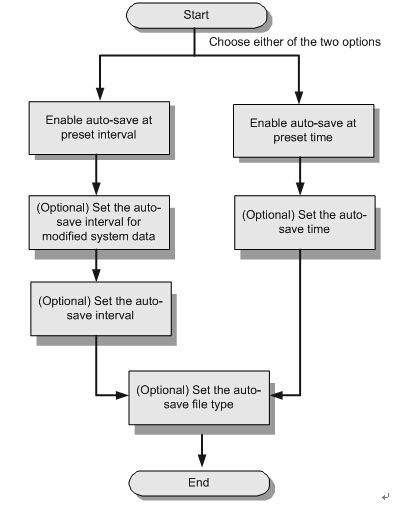
Figure 1 shows the flowchart for configuring the auto-save function.
Figure 1 Flowchart for configuring the auto-save function
7-17 ma5600
Procedure
  • Configure auto-save at preset interval.
    1. In the global config mode, run the autosave interval on command to enable auto-save at preset interval.
Auto-save at preset interval conflicts with auto-save at preset time. You can enable only one of them.
  1. (Optional) In the global config mode, run the autosave interval configuration command to set the auto-save interval for modified system data.
Auto-save is performed according to the interval set by the user. The system checks whether the system data is modified at each interval. If the system data is modified, the system saves the data. Otherwise, the system does not save the data. By default, the interval is 30 minutes.
  1. (Optional) In the global config mode, run the autosave interval command to set the auto-save interval.
After the setting, the system data is automatically saved at the set interval regardless of whether the system data is modified. By default, the interval is 24 hours.
  1. (Optional) Set the auto-save file type.
In the global config mode, run the autosave type command to set the auto-save file type.
  • Configure auto-save at preset time.
    1. In the global mode, run the autosave time on command to enable auto-save at preset time.
Auto-save at preset time conflicts with auto-save at preset interval. You can enable only one of them.
  1. (Optional) In the global config mode, run the autosave time command to set the auto-save time.
After the setting, the system data is automatically saved at the set time regardless of whether the system data is modified. By default, the time is 00:00:00.
  1. (Optional) Set the auto-save file type.
In the global config mode, run the autosave type command to set the auto-save file type.
Example
To enable auto-save at preset interval on the MA5600, set the auto-save interval to two days (2880 minutes), and save both the database file and the configuration file, do as follows:
huawei(config)#autosave interval on
huawei(config)#autosave interval 2880
huawei(config)#autosave type all
huawei(config)#save

More related:

How To Reset Huawei OLT MA5600T Series Equipment Password

Tuesday, February 23, 2016

Huawei MA5616(CCUB or CCUC mainboard) Specifications

Huawei SmartAX MA5616 can be used as mini DSLAM or remote multi dwelling unit (MDU), provides broadband services on FTTB and FTTC networks. It is a box-type device, 2U height and 19-inch wide, the uplink can be GE, GPON, EPON or 10G GPON. MA5616 support ADSL2+,VDSL2, SHDSL, POTS, ISDN, FE and GE ports. Huanetwork customers normally use MA5616 as mini DSLAM to provide ADSL2+/VDSL2 to internet users, it can be connected to Huawei OLT through GPON, or connected to Ethernet switch or other MA5616 via GE ports. Huanetwork keeps MA5616 and its related cards and cables in stock and can ship to worldwide customers.

MA5616
(CCUB mainboard)Specifications
MA5616(CCUB mainboard) ma5616-ccub
TYPEPlug-in card MDU equipment
SIZE
(WxDxH)
2U,19inch
442mm×245mm×88.1mm
Temperature range-40 ℃ ~ + 65 ℃
Uplink2 port SFP , optional EPON/GPON/GE
PowerAC:220V/110V
DC:-48V
Backup Powersupport 48V backup power
Support the lead-acid batteries and lithium iron batteries
Type of business4 service slot

MA5616(CCUC miainboard)Specifications
MA5616(CCUC miainboard) ma5616-ccuc
ADLE32 ADSL2+with splitter,over POTS
ADPE64 ADSL2+with splitter, over POTS
VDGE16 VDSL2 (30a)with splitter, over POTS
VDSE24 VDSL2 (17a)
VDSHno splitter, over POTS
VDTHno splitter, over ISDN
VDMM48VDSL2  (17a)no splitter, over POTS
VDLE32 VDSL2 (17a)with splitter, over POTS
CALE32 ADSL2+ ComboADSL2+ 和POTS
ASRB32 POTS
ASPB64 POTS
DSLD8 ISDN
SHLH16 SHDSL
EIUD4GE(fiber & copper COMBO) + 4FE (fiber)
EIUA16 FE(copper)

Special Considerations
1, CCUB does not support EIUD, EIUA, VDMM, ADPE four board, only CCUC support.
2, CCUC does not support more than 128 POTS, there is a demand of customers please use CCUB.
3, VDMM board can only be used in DC power usage scenarios.

The more information about technical support you can consult with our engineer the e-mail address is as below:

More related:

The Issue that the MA5600T H802GPBD Board Resets Repeatedly