H805GPBD is a 8-port GPON OLT MA5603T MA5600T MA5608T Interface Board. It works with the optical network terminal (ONT) to provide GPON access service.
Working Principle
The basic working principle of the H805GPBD board is as follows:
The control module loads the board software, controls the running of the board, and
manages the board.
The switching module aggregates the signals from eight GPON ports.
The interface module converts between GPON signals and Ethernet packets.
The power module supplies power to other functional modules of the board.
The clock module provides the working clock for other functional modules of the board.
Thunder-link.com supply original new Huawei optical network equipments, offering all series Huawei OSN, Huawei OLT, Huawei Switch, Huawei SDH, Huawei WDM,Huawei ONT products with good quality and one year warranty. Welcome visit our website:www.thunder-link.com or send e-mail:Sales@thunder-link.com
Showing posts with label MA5603T. Show all posts
Tuesday, November 21, 2017
Monday, November 6, 2017
How to Replace an Huawei ONU Rapidly?
To replace a faulty optical network unit (ONU) on a live network, you need to reload the configurations after the replacement or back up the data before loading the configurations. The operations are complicated and prone to errors. Using the network management system (NMS) to replace the ONU improves the efficiencies in device replacement and configuration loading, and at the same time reduces the error probabilities. There are five steps for replacing an ONU rapidly.
- Configure automatic backup policies and automatic upgrade policies. (This is the prerequisite of the replacement.)
- After the automatic backup policy is configured, the device backs up data at the configured time. The latest backup database will be used during the replacement.
- After the automatic upgrade policy is configured, the NMS will create an automatic ONU upgrade task to upgrade the ONU if the ONU version is different from the target version set in the automatic upgrade policy.
- Replace the ONU and power on the ONU to ensure that the optical link on the device is normal.
- Start the ONU replacement operation on the NMS.
- Bind the MAC address of the new ONU on the NMS.
- Check the configurations and verify the services after the replacement.
More related:
Monday, September 18, 2017
FTTH Networking and Configuration Scenarios
Typical FTTH networking diagram
Bridging ONT + HGW Network Scenario
Gateway ONT Network Scenario
Bridging ONT + HGW Network Scenario
The HGW integrating an IAD provides Internet, voice over Internet Protocol (VoIP), and Internet Protocol television (IPTV) services to users.
Services are implemented on the HGW, and the bridging ONT works with the OLT to provide Layer 2 channels.
Bridging+Voice ONT Network Scenario
The ONT integrating an integrated access device (IAD) provides Internet, VoIP, and IPTV services to users.
The bridging+voice ONT provides Layer 2 data and voice services. This scenario provides transparent transmission channels and requires simple service configuration, so this scenario applies to Layer 2 networking.
- For data services, a PC directly performs dial-up. Then, the upper-layer broadband remote access server (BRAS) device authenticates and accesses the PC. The PC can also access the Internet using the Dynamic Host Configuration Protocol (DHCP) or static IP address.
- The ONT with a built-in voice module encapsulates voice service packets, and the OLT transmits them to the upstream next generation network (NGN) or IP multimedia subsystem (IMS).
Gateway ONT Network Scenario
Huawei ONT integrating an IAD provides Internet, VoIP, and IPTV services to users.
The HGW ONT facilitates interconnection of home devices by providing Layer 3 services, such as Point-to-Point Protocol over Ethernet (PPPoE)/DHCP dial-up, network address translation (NAT), and Internet Group Management Protocol (IGMP) snooping. This scenario provides fine-grained management channels and service control, and applies to Layer 3 networking.
FTTH Deployment Schemes
FTTH service application includes the deployment process and service provisioning process. The FTTH deployment process includes OLT deployment (configuration) and configuration of basic data. No deployment, however, is required on the ONT and the ONT is plug and play once services are provisioned.
FTTH deployment schemes
Scheme
- On the NMS: Profiles can be issued in batches.
- Using commands on the OLT: Configuration scripts containing commands can be imported to the OLT.
- Using the OSS: This method is recommended and it can implement automatic service provisioning, and eliminate problems caused by manual service provisioning, such as large workload, low efficiency, and difficult management.
- Using OSS+ITMS: This method is recommended if the multiple private nodes are customized for carriers. Using a TR069 server, new gateways and value-added voice services can be simply added.
- Layer 2 configuration data is issued on the NMS or OLT MA5603T or MA5600T.
- Other configuration data such as voice, Layer 3, and Wi-Fi data is issued using the ITMS.
- On the NMS: It applies to the scenario when no OSS is available and services need to be provisioned manually on the NMS.
- On the ONT web page: When it is not feasible to provision services on the OSS or NMS, you can log in to the ONT web page and configure or modify parameters to provision services.
- DBA profile
- Line profile
- Service profile
- IP traffic profile
- Service level profile
- Global OLT configurations (rather than FTTH user configurations) such as multicast VLAN, multicast mode, and policy of forwarding unknown packets
- FTTH user service VLAN configurations including adding VLANs, setting the attributes of VLANs, and adding upstream ports for VLANs
- Customized parameters are usually issued by the upper-layer system during service provisioning.
- Common parameters are usually configured at delivery or during data pre-configuration.
Monday, August 14, 2017
What Is the Relationship Between the LOF and LOS Alarms?
How to detect LOF and LOS alarms and what is the relationship between these two alarms? What alarm is generated if optical fibers are removed when Huawei MA5606T or MA5652G serves as an Huawei ONU?
LOF indicates loss of frame. When such an alarm is generated, the ONU can receive optical signals. LOS indicates loss of signal. When such an alarm is generated, the ONU fails to receive optical signals. The mechanisms of detecting LOFi and LOSi alarms are as follows:
- LOFi: If four consecutive frames of an OLT fail to locate an upstream frame of an ONU, the LOFi alarm is generated and the ONU goes offline.
- LOSi: If four consecutive frames of Huawei OLT fail to receive an upstream optical signal of an ONU, the LOFi alarm is generated and the ONU goes offline.
The relationship between the LOF and LOS alarms is as follows:
- Use an optical attenuator to test the ATM 155/622 Mbit/s optical port and increase the attenuation gradually. It is found that the alarm status changes as follows: normal -> SD -> LOF -> LOS. This indicates that after LOF is generated, if the attenuation is increased further, no optical signal is received and LOS is generated. If an optical fiber is removed, LOF may be generated first and then LOS, which is related to the alarm detection mechanism. The LOSi, LOFi, and LCDGi alarms are detected in the time window mode. In the first several detections, if the time window detects the threshold for frame losing, the LOFi alarm will be generated.
- If the PON line generates an LOF alarm, LOS will not be generated. This is because the PON port uses the time division system. If an LOF alarm is generated, the ONT goes offline and then the OLT like MA5603T does not assign the timeslot (bandwidth) to the ONU. Therefore, the OLT does not detect whether the ONT transmits upstream optical signals and an LOS alarm is not generated.
- If LOS is generated, LOF/SD will be suppressed. This is because LOS is the alarm of the highest severity.
When the MA5606T and MA5652G serve as an ONU and the optical patch is normal, LOS is generated when an optical fiber is removed.
Wednesday, March 9, 2016
Huawei MA5600 Series Boards Description
The MA5600 supports the super control unit (SCU) board, service interface boards, and SPL boards. Each type of board is different in function.
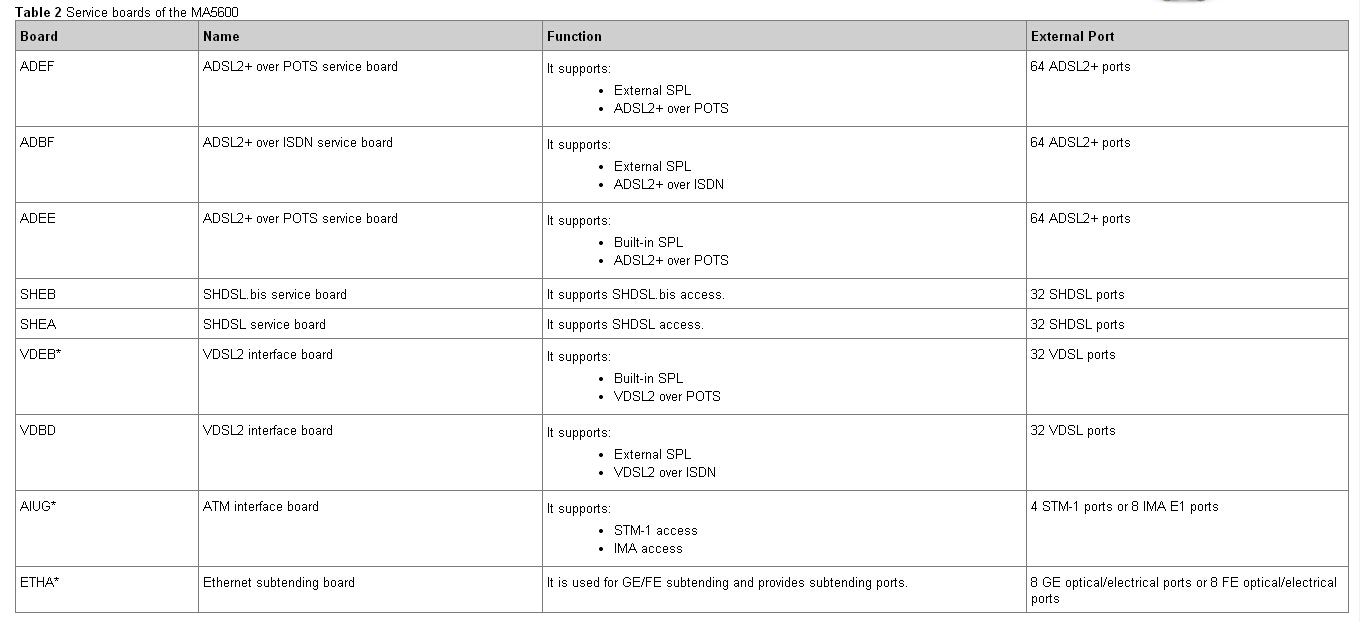
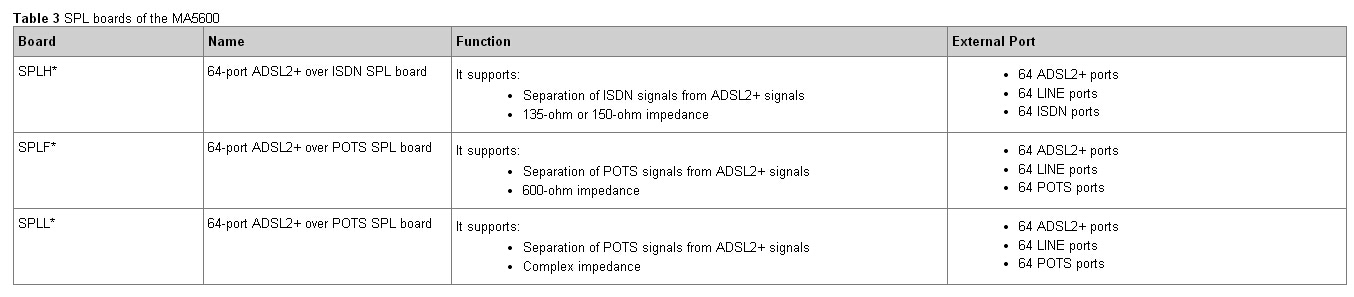
The boards of the MA5600 include the control boards, service boards, and other boards. Table 1, Table 2 and Table 3 list the boards of the MA5600 respectively.
NOTE:
The boards decorated with * are not supported by the Huawei MA5603T
Table 1 Service boards of the MA5600
Table 2 Control boards of the MA5600
Table 3 SPL boards of the MA5600
Telephone: 852-30623083
Email: Sales@Thunder-Link.com
Website: http://www.thunder-link.com
More related:
Introduction to MSTP_Prelude_Overview and History
Tuesday, March 8, 2016
Configuring the DHCP for Huawei OLT – the Standard DHCP Mode
How to configure the DHCP for Huawei OLT, you should know configure the standard DHCP mode, option60 mode and the MAC address segment mode.
This topic is applicable to the scenario for specifying the corresponding DHCP server groups for different users of the VLAN (the VLAN that is used when the service ports are created).
Procedure
The IP address of the DHCP server configured here must be the same as the IP address of the DHCP server on the network side.
NOTICE:
Example
Assume that server group 1 contains two DHCP servers working in active/standby mode, with the maximum response time of 20s, the maximum count of response timeout of 10, the IP address of the primary server 10.1.1.9 and the IP address of the secondary server 10.1.1.10. To bind server group 1 to users in VLAN 2 (with the IP address of the L3 interface 10.1.1.101), do as follows:
huawei(config)#dhcp mode layer-3 standard
huawei(config)#dhcp server mode backup 20 10
huawei(config)#dhcp-server 1 ip 10.1.1.9 10.1.1.10
huawei(config)#interface vlanif 2
huawei(config-if-vlanif2)#ip address 10.1.1.101 24
huawei(config-if-vlanif2)#dhcp-server 1
This topic is applicable to the scenario for specifying the corresponding DHCP server groups for different users of the VLAN (the VLAN that is used when the service ports are created).
Procedure
- Configure the DHCP forwarding mode.
- Configure the DHCP server group.
- In the global config mode, run the dhcp-server command to create a DHCP server group.
- group-number: Indicates the number of the DHCP server group. It identifies a server group. You can run the display dhcp-server all-group command to query the DHCP server groups that are already configured and select a DHCP server group number that is not used by the system.
- ip-addr: Indicates the IP address of the DHCP server in the DHCP server group. Up to four IP addresses can be entered.
- In the global config mode, run the dhcp-server command to create a DHCP server group.
The IP address of the DHCP server configured here must be the same as the IP address of the DHCP server on the network side.
- (Optional) Run the dhcp server mode command to configure the working mode of the DHCP server.
- Bind the DHCP server to the VLAN.
- In the global config mode, run the interface vlanif command to create a VLAN L3 interface.
- In the VLANIF mode, run the ip address command to configure the IP address of the VLAN L3 interface.
NOTICE:
- If only an L2 device exists between the MA5600 and the DHCP server, the IP address of the VLAN L3 interface needs to be in the same subnet as the IP address of the DHCP server.
- If the upper-layer device of the MA5600 is an L3 device, the IP address of the VLAN L3 interface and the IP address of the DHCP server can be in different subnets; however, a route must exist between the VLAN L3 interface and the DHCP server.
- In the VLANIF mode, run the dhcp-server command to bind the DHCP server to the VLAN.
Example
Assume that server group 1 contains two DHCP servers working in active/standby mode, with the maximum response time of 20s, the maximum count of response timeout of 10, the IP address of the primary server 10.1.1.9 and the IP address of the secondary server 10.1.1.10. To bind server group 1 to users in VLAN 2 (with the IP address of the L3 interface 10.1.1.101), do as follows:
huawei(config)#dhcp mode layer-3 standard
huawei(config)#dhcp server mode backup 20 10
huawei(config)#dhcp-server 1 ip 10.1.1.9 10.1.1.10
huawei(config)#interface vlanif 2
huawei(config-if-vlanif2)#ip address 10.1.1.101 24
huawei(config-if-vlanif2)#dhcp-server 1
Telephone: 852-30623083
Email: Sales@Thunder-Link.com
Website: http://www.thunder-link.com
More related:
Introduction to MSTP_Prelude_Overview and History
The Function of MA5600 Boards
The Huawei MA5600 supports the super control unit (SCU) board, service interface boards, and SPL boards. Each type of board is different in function.The boards of the MA5600 include the control boards, service boards, and other boards. Table 1, Table 2 and Table 3 list the boards of the MA5600 respectively.
Note:The boards decorated with * are not supported by the MA5603T.
Table 1 Control board of the MA5600
Table 2 Service boards of the MA5600
Table 3 SPL boards of the MA5600
Note:The boards decorated with * are not supported by the MA5603T.
Table 1 Control board of the MA5600
| Board | Name | Function | External Port |
| SCU | Super control unit | It controls, aggregates, and processes the broadband services. | 1 maintenance port |
| It provides GE/FE ports. | 1 serial port | ||
| The two boards support active-standby hot backup. | 1 environment monitoring port | ||
| It supports the Jumbo frame feature. | 6 GE/FE ports |
Table 2 Service boards of the MA5600
| Board | Name | Function | External Port |
| ADEF | ADSL2+ over POTS service board | It supports: | 64 ADSL2+ ports |
| External SPL | |||
| ADSL2+ over POTS | |||
| ADBF | ADSL2+ over ISDN service board | It supports: | 64 ADSL2+ ports |
| External SPL | |||
| ADSL2+ over ISDN | |||
| ADEE | ADSL2+ over POTS service board | It supports: | 64 ADSL2+ ports |
| Built-in SPL | |||
| ADSL2+ over POTS | |||
| SHEB | SHDSL.bis service board | It supports SHDSL.bis access. | 32 SHDSL ports |
| SHEA | SHDSL service board | It supports SHDSL access. | 32 SHDSL ports |
| VDEB* | VDSL2 interface board | It supports: | 32 VDSL ports |
| Built-in SPL | |||
| VDSL2 over POTS | |||
| VDBD | VDSL2 interface board | It supports: | 32 VDSL ports |
| External SPL | |||
| VDSL2 over ISDN | |||
| AIUG* | ATM interface board | It supports: | 4 STM-1 ports or 8 IMA E1 ports |
| STM-1 access | |||
| IMA access | |||
| ETHA* | Ethernet subtending board | It is used for GE/FE subtending and provides subtending ports. | 8 GE optical/electrical ports or 8 FE optical/electrical ports |
Table 3 SPL boards of the MA5600
| Board | Name | Function | External Port |
| SPLH* | 64-port ADSL2+ over ISDN SPL board | It supports: | 64 ADSL2+ ports |
| Separation of ISDN signals from ADSL2+ signals | 64 LINE ports | ||
| 135-ohm or 150-ohm impedance | 64 ISDN ports | ||
| SPLF* | 64-port ADSL2+ over POTS SPL board | It supports: | 64 ADSL2+ ports |
| Separation of POTS signals from ADSL2+ signals | 64 LINE ports | ||
| 600-ohm impedance | 64 POTS ports | ||
| SPLL* | 64-port ADSL2+ over POTS SPL board | It supports: | 64 ADSL2+ ports |
| Separation of POTS signals from ADSL2+ signals | 64 LINE ports | ||
| Complex impedance | 64 POTS ports |
Telephone: 852-30623083
Email: Sales@Thunder-Link.com
Website: http://www.thunder-link.com
More related:
Introduction to MSTP_Prelude_Overview and History
Thursday, March 3, 2016
ONU Frequently Goes Online and Offline(5) – a Too Large Split Ratio
SmartAX MA5600T/MA5603T Multi-service Access Module Troubleshooting: ONU Frequently Goes Online and Offline: TC-C6214 ONU Frequent Going Online and Offline Because of a Too Large Split Ratio, also the MA5616 works, too.
Fault Description
Network topology: Originally, the system uses one-level optical split and the split ratio is 1:8. Later, the customer connects a 1:16 optical splitter to the 1:8 optical splitter. The three ONUs are connected to the 1:16 optical splitter.
During deployment in an office, three ONUs frequently go online and offline.
Alarm Information
None
Possible Cause
l The ONU receive optical power is larger than the overload optical power.
l The ONU receive optical power is smaller than the sensitivity.
l There is abnormal attenuation on ODN lines.
Procedure
Step 1 Test the ONU receive optical power. It is found that the receive optical power of the three ONUs is approaching the sensitivity.
Step 2 Analyze the total split ratio of the three ONUs. It is found that the total split ratio is 1: (16 x 8) = 1:128, which is too large and therefore causing too large attenuation, as shown in Figure 1.
Figure 1 Too large split ratio

Step 3 Change the 1:16 optical splitter to a 1:4 one. Then, the fault is rectified.
Step 4 Such a fault does not recur in the next week.
—-End
Suggestion and Conclusion
Bit errors will occur on an ONU if the ONU receive optical power is approaching the sensitivity and even the ONU may go offline. Reserve a 3 dBm attenuation margin in ODN planning.
NOTE
The specifications of the optical path attenuation are as follows (the following are theoretical values and the actual values vary with the environment):
l The optical attenuation on the ONU GPON port should be within the range of 15 dBm to 25 dBm.
l The attenuation on an optical fiber is about 0.3 dB per kilometer.
l The attenuation for an optical splitter is as follows:
l 1:2 optical splitter: 3 dBm
l 1:4 optical splitter: 6 dBm
l 1:8 optical splitter: 9 dBm
l 1:16 optical splitter: 12 dBm
l 1:32 optical splitter: 15 dBm
l 1:64 optical splitter: 18 dBm
5 ONU Frequently Goes Online and Offline(1) – a Rogue ONU
SmartAX MA5600T/MA5603T Multi-service Access Module Troubleshooting: ONU Frequently Goes Online and Offline: TC-C6217 ONU Frequent Going Online and Offline Caused by a RogueONU.
This topic describes how to troubleshoot the fault of ONU frequent going online and offline.
Fault Description
All ONUs connected to a port in an office frequently go online and offline after a flood.
Alarm Information
Rogue ONU alarm
Possible Cause
l The ONU receive optical power is larger than the overload optical power.
l The ONU receive optical power is smaller than the sensitivity.
l There is abnormal attenuation on ODN lines.
Procedure
Step 1 After communicating with the customer, we learn that there was once a flood some ONUs are flooded.
Step 2 Analyze the condition. Only certain ONUs are flooded. This should not cause all ONUs to go offline repeatedly. It is concluded that the optical modules of certain ONUs transmit signals abnormally because of flood and the ONUs become rogue ONUs.
Step 3 Check optical lines one by one near the optical splitter. It is found that one ONU works in the continuous mode, as shown in Figure 2.

Step 4 Replace the ONU. System services recover.
Step 5 Such a fault does not recur in the next week.
—-End
Suggestion and Conclusion
In normal conditions, ONU signal transmit timeslots are controlled by the OLT. A rogue ONU is an ONU that goes out of control of the OLT and works in the continuous mode or irregular mode. You can locate a rogue ONU manually or locate a rogue ONU by querying alarms generated on the OLT. If a rogue ONU is detected, replace it in time.
More related:
Fault Description
Network topology: Originally, the system uses one-level optical split and the split ratio is 1:8. Later, the customer connects a 1:16 optical splitter to the 1:8 optical splitter. The three ONUs are connected to the 1:16 optical splitter.
During deployment in an office, three ONUs frequently go online and offline.
Alarm Information
None
Possible Cause
l The ONU receive optical power is larger than the overload optical power.
l The ONU receive optical power is smaller than the sensitivity.
l There is abnormal attenuation on ODN lines.
Procedure
Step 1 Test the ONU receive optical power. It is found that the receive optical power of the three ONUs is approaching the sensitivity.
Step 2 Analyze the total split ratio of the three ONUs. It is found that the total split ratio is 1: (16 x 8) = 1:128, which is too large and therefore causing too large attenuation, as shown in Figure 1.
Figure 1 Too large split ratio

Step 3 Change the 1:16 optical splitter to a 1:4 one. Then, the fault is rectified.
Step 4 Such a fault does not recur in the next week.
—-End
Suggestion and Conclusion
Bit errors will occur on an ONU if the ONU receive optical power is approaching the sensitivity and even the ONU may go offline. Reserve a 3 dBm attenuation margin in ODN planning.
NOTE
The specifications of the optical path attenuation are as follows (the following are theoretical values and the actual values vary with the environment):
l The optical attenuation on the ONU GPON port should be within the range of 15 dBm to 25 dBm.
l The attenuation on an optical fiber is about 0.3 dB per kilometer.
l The attenuation for an optical splitter is as follows:
l 1:2 optical splitter: 3 dBm
l 1:4 optical splitter: 6 dBm
l 1:8 optical splitter: 9 dBm
l 1:16 optical splitter: 12 dBm
l 1:32 optical splitter: 15 dBm
l 1:64 optical splitter: 18 dBm
5 ONU Frequently Goes Online and Offline(1) – a Rogue ONU
SmartAX MA5600T/MA5603T Multi-service Access Module Troubleshooting: ONU Frequently Goes Online and Offline: TC-C6217 ONU Frequent Going Online and Offline Caused by a RogueONU.
This topic describes how to troubleshoot the fault of ONU frequent going online and offline.
Fault Description
All ONUs connected to a port in an office frequently go online and offline after a flood.
Alarm Information
Rogue ONU alarm
Possible Cause
l The ONU receive optical power is larger than the overload optical power.
l The ONU receive optical power is smaller than the sensitivity.
l There is abnormal attenuation on ODN lines.
Procedure
Step 1 After communicating with the customer, we learn that there was once a flood some ONUs are flooded.
Step 2 Analyze the condition. Only certain ONUs are flooded. This should not cause all ONUs to go offline repeatedly. It is concluded that the optical modules of certain ONUs transmit signals abnormally because of flood and the ONUs become rogue ONUs.
Step 3 Check optical lines one by one near the optical splitter. It is found that one ONU works in the continuous mode, as shown in Figure 2.

Step 4 Replace the ONU. System services recover.
Step 5 Such a fault does not recur in the next week.
—-End
Suggestion and Conclusion
In normal conditions, ONU signal transmit timeslots are controlled by the OLT. A rogue ONU is an ONU that goes out of control of the OLT and works in the continuous mode or irregular mode. You can locate a rogue ONU manually or locate a rogue ONU by querying alarms generated on the OLT. If a rogue ONU is detected, replace it in time.
More related:
ONU Frequently Goes Online and Offline(4) – a Too Small Fiber Bend Radius
ONU Frequently Goes Online and Offline(3) – Mismatching Fiber Connector
ONU Frequently Goes Online and Offline(2) – Unmatched Optical Fiber Connectors
ONU Frequently Goes Online and Offline(1) – Unstable Voltage
Labels:
Access network,
HG8010,
Huawei DSLAM,
Huawei GPON,
Huawei HG8010,
Huawei HG8010 GPON,
Huawei MA5600,
Huawei MA5600T,
Huawei MA5603T,
Huawei OLT,
Huawei ONT,
Huawei ONU,
MA5600,
MA5600T,
MA5603T
ONU Frequently Goes Online and Offline(4) – a Too Small Fiber Bend Radius
SmartAX MA5600T/MA5603T HG8010 GPON Terminal Multi-service Access Module Troubleshooting: ONU Frequently Goes Online and Offline: TC-C6208 ONU Frequent Going Online and Offline Because of a Too Small Fiber Bend Radius
This topic describes how to troubleshoot the fault of ONU frequent going online and offline.
Fault Description
Network topology: Optical split level: one level; split ratio: 1:32; backbone fiber: 8.6 km long; branch fiber: 1.5 km long. In an office, an ONU frequently goes online and offline.
Alarm Information
LOSi alarm and LOFi alarm
Possible Cause
l The ONU receive optical power is larger than the overload optical power.
l The ONU receive optical power is smaller than the sensitivity.
l There is abnormal attenuation on ODN lines.
Procedure
Step 1 Test the receive optical power on ONU optical ports. It is found that the receive optical power is only -28 dBm. This indicates that there is abnormal attenuation on ODN lines.
Step 2 Check field conditions. It is found that fibers are placed disorderly, the fiber bend radius is too small and the fiber is almost broken, as shown in Figure 1.
Figure 1 Too small fiber bend radius

Step 3 Replace the fiber and test the ONU receive optical power again. -18 dBm optical power is obtained and services recover. This indicates that the too small fiber bend radius causes abnormal attenuation on ODN lines and consequently causes the ONU to go online and offline frequently.
Step 4 Such a fault does not recur in the next week.
—-End
Suggestion and Conclusion
Make sure that the fiber bend diameter is larger than 8 cm when bending a fiber.
More related:
This topic describes how to troubleshoot the fault of ONU frequent going online and offline.
Fault Description
Network topology: Optical split level: one level; split ratio: 1:32; backbone fiber: 8.6 km long; branch fiber: 1.5 km long. In an office, an ONU frequently goes online and offline.
Alarm Information
LOSi alarm and LOFi alarm
Possible Cause
l The ONU receive optical power is larger than the overload optical power.
l The ONU receive optical power is smaller than the sensitivity.
l There is abnormal attenuation on ODN lines.
Procedure
Step 1 Test the receive optical power on ONU optical ports. It is found that the receive optical power is only -28 dBm. This indicates that there is abnormal attenuation on ODN lines.
Step 2 Check field conditions. It is found that fibers are placed disorderly, the fiber bend radius is too small and the fiber is almost broken, as shown in Figure 1.
Figure 1 Too small fiber bend radius

Step 3 Replace the fiber and test the ONU receive optical power again. -18 dBm optical power is obtained and services recover. This indicates that the too small fiber bend radius causes abnormal attenuation on ODN lines and consequently causes the ONU to go online and offline frequently.
Step 4 Such a fault does not recur in the next week.
—-End
Suggestion and Conclusion
Make sure that the fiber bend diameter is larger than 8 cm when bending a fiber.
More related:
ONU Frequently Goes Online and Offline(3) – Mismatching Fiber Connector
ONU Frequently Goes Online and Offline(2) – Unmatched Optical Fiber Connectors
ONU Frequently Goes Online and Offline(1) – Unstable Voltage
Labels:
Access network,
HG8010,
Huawei DSLAM,
Huawei GPON,
Huawei HG8010,
Huawei HG8010 GPON,
Huawei MA5600,
Huawei MA5600T,
Huawei MA5603T,
Huawei OLT,
Huawei ONT,
Huawei ONU,
MA5600,
MA5600T,
MA5603T
ONU Frequently Goes Online and Offline(3) – Mismatching Fiber Connector
SmartAX MA5600T/MA5603T Multi-service Access Module Troubleshooting: ONU Frequently Goes Online and Offline: TC-C6207 ONU Frequent Going Online and Offline Because ofMismatching Fiber Connector, and how to solve the similar product MA5606T, MA5616troubleshooting, you can referce from this chapter, too.
Fault Description
Network topology: Optical split level: one level; split ratio: 1:32; connector: SC/APC connector. In an office, an ONU frequently goes online and offline.
Alarm Information
LOSi alarm and LOFi alarm
Possible Cause
l The ONU receive optical power is larger than the overload optical power.
l The ONU receive optical power is smaller than the sensitivity.
l There is abnormal attenuation on ODN lines.
Procedure
Step 1 Test the receive optical power on ONU optical ports. It is found that the receive optical power is -27 dBm. This indicates that there is abnormal attenuation on ODN lines.
Step 2 Perform a test on the optical splitter. It is found that the connector of the optical splitter is an SC/APC connector but that of the ONU fiber is an SC/PC connector. When an APC-endface fiber is connected to a PC-endface fiber, at least 3 dB attenuation will be generated, as shown inFigure 1.
Figure 1 Interconnection of PC and APC connectors

Step 3 Remove the SC/PC fiber (blue) and splice it to an SC/APC fiber (green). Test the ONU receive optical power again. It is found that the receive optical power becomes -23.5 dBm, which is within the normal range. This indicates that the mismatching fiber connector causes abnormal attenuation on ODN lines and consequently causes the ONU to go online and offline frequently.
Step 4 Such a fault does not recur in the next week.
—-End
Suggestion and Conclusion
It is recommended that you connect an SC/PC connector to an SC/PC connector (or an SC/APC connector to an SC/APC connector). The biggest difference between an SC/PC connector and an SC/APC connector lies in that the endface of an SC/PC connector is a plane but the endface of an SC/APC connector is a slop. If an SC/PC connector is connected to an SC/APC connector, at least 3 dB attenuation will be generated.
More related:
Fault Description
Network topology: Optical split level: one level; split ratio: 1:32; connector: SC/APC connector. In an office, an ONU frequently goes online and offline.
Alarm Information
LOSi alarm and LOFi alarm
Possible Cause
l The ONU receive optical power is larger than the overload optical power.
l The ONU receive optical power is smaller than the sensitivity.
l There is abnormal attenuation on ODN lines.
Procedure
Step 1 Test the receive optical power on ONU optical ports. It is found that the receive optical power is -27 dBm. This indicates that there is abnormal attenuation on ODN lines.
Step 2 Perform a test on the optical splitter. It is found that the connector of the optical splitter is an SC/APC connector but that of the ONU fiber is an SC/PC connector. When an APC-endface fiber is connected to a PC-endface fiber, at least 3 dB attenuation will be generated, as shown inFigure 1.
Figure 1 Interconnection of PC and APC connectors

Step 3 Remove the SC/PC fiber (blue) and splice it to an SC/APC fiber (green). Test the ONU receive optical power again. It is found that the receive optical power becomes -23.5 dBm, which is within the normal range. This indicates that the mismatching fiber connector causes abnormal attenuation on ODN lines and consequently causes the ONU to go online and offline frequently.
Step 4 Such a fault does not recur in the next week.
—-End
Suggestion and Conclusion
It is recommended that you connect an SC/PC connector to an SC/PC connector (or an SC/APC connector to an SC/APC connector). The biggest difference between an SC/PC connector and an SC/APC connector lies in that the endface of an SC/PC connector is a plane but the endface of an SC/APC connector is a slop. If an SC/PC connector is connected to an SC/APC connector, at least 3 dB attenuation will be generated.
More related:
ONU Frequently Goes Online and Offline(2) – Unmatched Optical Fiber Connectors
ONU Frequently Goes Online and Offline(1) – Unstable Voltage
ONU Frequently Goes Online and Offline(2) – Unmatched Optical Fiber Connectors
SmartAX MA5600T/MA5603T Multi-service Access Module Troubleshooting: ONU Frequently Goes Online and Offline:TC-C6311 An ONT Frequently Goes Online and Offline Because of Unmatched Optical Fiber Connectors
This topic describes how to troubleshoot the fault when the deployed ONT frequently goes online and offline because the optical fiber connectors do not match.
Fault Description
When an ONT is installed in the deployment, the optical path attenuation is -23 dBm, which is within the normal attenuation range. After the optical fibers are connected, the LED of the PON port blinks. In addition, the ONT fails to register with the OLT normally, and the ONT goes online and offline frequently.
Alarm Information
The up and down alarms about the ONT (OT928) are generated on the OLT.
Cause Analysis
l The optical path attenuation is very large.
l The optical fiber connectors are not clean or not connected properly.
Procedure
Step 1 Use an optical power meter to measure the optical path attenuation. It is found that the optical path attenuation is -23 dBm, which is within the normal range of the optical path attenuation.
Step 2 It is suspected that the poor quality of optical signals is caused by the dirty optical fiber connectors of the ONT (OT928). Clean the optical fiber connectors, and remove and then insert the optical fiber connectors again. The fault, however, persists.
Step 3 Replace the ONT with another ONT (OT928) to conduct a test. The fault, however, persists, which indicates that the hardware of the ONT (OT928) is normal.
Step 4 Check the fiber patch cord of the ONT (OT928). It is found that the connector of the fiber patch cord does not match the optical fiber connector of the ONT. Though the connector of the fiber patch cord is square, the color is different. After verification, the optical fiber connectors used in the ONT (OT928) are green, square, and SC/APC.
NOTE
The BOM is 14130252, and the name is Patch Cord, SC/APC-FC/PC, Singlemode-G.652, 3mm, 3m.
Step 5 Replace the fiber patch cord with a correct fiber patch cord (SC/APC-FC/PC). As a result, the LED of the PON port is stable, and the ONT can register with the OLT normally.
—-End
Suggestion and Conclusion
Currently, the type of the fiber patch cord used in the ONT (OT928) is seldom used in China, but is mostly used abroad. Therefore, note that you should use the correct fiber patch cord.
The greatest difference between green and blue fiber patch cords is as follows: The
interconnection section between the fiber patch cord with green connectors and the OT928 is oblique. The interconnection section between the fiber patch cord with blue connectors and the ONT is plane, which can result in 3-6 dBm optical attenuation.
More related:
This topic describes how to troubleshoot the fault when the deployed ONT frequently goes online and offline because the optical fiber connectors do not match.
Fault Description
When an ONT is installed in the deployment, the optical path attenuation is -23 dBm, which is within the normal attenuation range. After the optical fibers are connected, the LED of the PON port blinks. In addition, the ONT fails to register with the OLT normally, and the ONT goes online and offline frequently.
Alarm Information
The up and down alarms about the ONT (OT928) are generated on the OLT.
Cause Analysis
l The optical path attenuation is very large.
l The optical fiber connectors are not clean or not connected properly.
Procedure
Step 1 Use an optical power meter to measure the optical path attenuation. It is found that the optical path attenuation is -23 dBm, which is within the normal range of the optical path attenuation.
Step 2 It is suspected that the poor quality of optical signals is caused by the dirty optical fiber connectors of the ONT (OT928). Clean the optical fiber connectors, and remove and then insert the optical fiber connectors again. The fault, however, persists.
Step 3 Replace the ONT with another ONT (OT928) to conduct a test. The fault, however, persists, which indicates that the hardware of the ONT (OT928) is normal.
Step 4 Check the fiber patch cord of the ONT (OT928). It is found that the connector of the fiber patch cord does not match the optical fiber connector of the ONT. Though the connector of the fiber patch cord is square, the color is different. After verification, the optical fiber connectors used in the ONT (OT928) are green, square, and SC/APC.
NOTE
The BOM is 14130252, and the name is Patch Cord, SC/APC-FC/PC, Singlemode-G.652, 3mm, 3m.
Step 5 Replace the fiber patch cord with a correct fiber patch cord (SC/APC-FC/PC). As a result, the LED of the PON port is stable, and the ONT can register with the OLT normally.
—-End
Suggestion and Conclusion
Currently, the type of the fiber patch cord used in the ONT (OT928) is seldom used in China, but is mostly used abroad. Therefore, note that you should use the correct fiber patch cord.
The greatest difference between green and blue fiber patch cords is as follows: The
interconnection section between the fiber patch cord with green connectors and the OT928 is oblique. The interconnection section between the fiber patch cord with blue connectors and the ONT is plane, which can result in 3-6 dBm optical attenuation.
More related:
ONU Frequently Goes Online and Offline(1) – Unstable Voltage
SmartAX MA5600T/MA5603T Multi-service Access Module Troubleshooting: ONU Frequently Goes Online and Offline:
The ONU frequently going online and offline failure is a fault in which an ONU connected to aPON port of an OLT frequently goes online and offline and therefore the OLT reports a large number of ONU LOS and ONU signal recovery alarms.
There are several reasons if the ONU frequently goes online and offline, we will tell the detailed on this blog.
1 TC-C6007 An ONU Goes Online and Offline Repeatedly Because of
Unstable Voltage
This topic describes how to troubleshoot the fault when an ONU goes online and offline
repeatedly and alarms that the ONU goes online and offline repeatedly are generated on the OLT because of unstable voltage.
Fault Description
An ONU connected to an OLT in an office goes online and offline repeatedly and irregularly.
Alarm Information
Alarms that the ONU goes online and offline repeatedly are generated on the OLT.
Cause Analysis
l The optical fiber attenuation is very large.
l The hardware of the ONU is faulty.
l The boards on the OLT are faulty.
Procedure
Step 1 Other ONUs connected to the PON port are normal, which indicates that the PON board of the OLT is normal.
Step 2 Use an optical power meter to test the optical fiber attenuation on the ONU side. It is found that the optical fiber attenuation is -20 dB, which is normal. This indicates that the line is normal.
Step 3 Replace the ONU with another ONU. The fault, however, persists, which indicates that the hardware of the ONU is normal.
Step 4 The ONU on which the fault occurs is located in a remote mountain area. Therefore, it is suspected that the fault is caused by the surroundings. Log in to the ONU in the telnet mode, and then run the display alarm list all command to carefully view the alarms. It is found that the ONU resets in peak hours from 7:00 a.m. to 8:00 p.m. in four consecutive days. Therefore, it can be preliminarily determined that the fault is caused by the voltage.
Step 5 Use a multimeter to test the voltage on site. It is found that the ONU resets repeatedly due to unstable voltage. Replace the ONU with another ONU with the DC module. As a result, the fault is rectified.
—-End
Suggestion and Conclusion
The ONUs of Huawei support AC power supply and DC power supply. If an ONU uses the AC power supply, the ONU resets repeatedly when the voltage is unstable. If the voltage is abnormal and the normal voltage cannot be guaranteed, it is recommended that you use an ONU with the DC module.
More related:
Introduction to MSTP_Prelude_Overview and History
The ONU frequently going online and offline failure is a fault in which an ONU connected to aPON port of an OLT frequently goes online and offline and therefore the OLT reports a large number of ONU LOS and ONU signal recovery alarms.
There are several reasons if the ONU frequently goes online and offline, we will tell the detailed on this blog.
1 TC-C6007 An ONU Goes Online and Offline Repeatedly Because of
Unstable Voltage
This topic describes how to troubleshoot the fault when an ONU goes online and offline
repeatedly and alarms that the ONU goes online and offline repeatedly are generated on the OLT because of unstable voltage.
Fault Description
An ONU connected to an OLT in an office goes online and offline repeatedly and irregularly.
Alarm Information
Alarms that the ONU goes online and offline repeatedly are generated on the OLT.
Cause Analysis
l The optical fiber attenuation is very large.
l The hardware of the ONU is faulty.
l The boards on the OLT are faulty.
Procedure
Step 1 Other ONUs connected to the PON port are normal, which indicates that the PON board of the OLT is normal.
Step 2 Use an optical power meter to test the optical fiber attenuation on the ONU side. It is found that the optical fiber attenuation is -20 dB, which is normal. This indicates that the line is normal.
Step 3 Replace the ONU with another ONU. The fault, however, persists, which indicates that the hardware of the ONU is normal.
Step 4 The ONU on which the fault occurs is located in a remote mountain area. Therefore, it is suspected that the fault is caused by the surroundings. Log in to the ONU in the telnet mode, and then run the display alarm list all command to carefully view the alarms. It is found that the ONU resets in peak hours from 7:00 a.m. to 8:00 p.m. in four consecutive days. Therefore, it can be preliminarily determined that the fault is caused by the voltage.
Step 5 Use a multimeter to test the voltage on site. It is found that the ONU resets repeatedly due to unstable voltage. Replace the ONU with another ONU with the DC module. As a result, the fault is rectified.
—-End
Suggestion and Conclusion
The ONUs of Huawei support AC power supply and DC power supply. If an ONU uses the AC power supply, the ONU resets repeatedly when the voltage is unstable. If the voltage is abnormal and the normal voltage cannot be guaranteed, it is recommended that you use an ONU with the DC module.
More related:
Introduction to MSTP_Prelude_Overview and History
Subscribe to:
Posts (Atom)