Showing posts with label MA5680T. Show all posts

Thursday, March 17, 2016

MA5600T Multicast Feature Glance

Definition
Multicast is group communication where data is addressed to a group of destination 
hosts simultaneously. Each multicast address represents a multicast group and all hosts 
in a multicast group can receive the same data. Multicast applies in IPTV,multimedia 
conferencing, and gaming services.

Value
Reduces bandwidth overheads
Each link carries at most one copy of the same multicast data, maximally reducing bandwidth overheads.
Decreases load
Transmitting data in multicast mode decreases video server's and CPU's load and does not significantly increase network's load even if the number of users increases.
Prolongs transmission distance
Multicast packets can be transmitted across network segments,implementing long-distance transmission for large-scale data.
Prolongs transmission distance
Multicast packets can be transmitted across network segments,implementing long-distance transmission for large-scale data.
Application
Multicast applies in the following scenarios: FTTB/FTTC, FTTH, FTTO, as well as OLT user ports connecting to multicast users.

Highlights
Powerful Multicast Capabilities, Improving IPTV Service Deployment
Primary Features Performance
  • 8 K multicast users (1 K= 1024)
  • 4 K multicast programs
  • Concurrent playing of 4000 IPv4 and 2000 IPv6 multicast programs when the SCUH control board is used
  • Multiple levels of multicast data duplication
  • IGMP fast leave
  • 50-ms channel switching
  • 3200-pps IGMP packet processing if the SCUH control board is used
  • Physical-layer G.INP retransmission for better user experience on the IPTV service
  • 900-pps IGMP packet processing on the GPFD board
Features
  • Both IPv4 and  IPv6multicast
  • MLDv1 and MLDv2
  • MLD snooping andproxy
  • IGMPv2 and IGMPv3
  • VPLS multicast
Highlights
Conversion Between M-VLANs and C-VLANs, Implementing Multiple CPs Sharing One ONT and Supporting Open Access

The multicast data transmission meets the service requirement of multiple CPs renting different ports on the same ONT in the open access scenario, improving revenue from resources.
Layer 3 Multicast for Flexible Multicast Group Address Usages
The programs issued from different multicast sources can use the same group IP address (GIP).
Compared with Layer 2 multicast, Layer 3 multicast relieves GIP limitations due to group MAC address (GMAC) conflict.

Highlights
Comprehensive Fault Locating Methods, Facilitating Rapid Multicast Service Fault Rectification
User Log Identify causes for program ordering failures by querying user logs or fault-related operation records.
IGMP Statistics Identify IGMP packet transmit and receive issues based on IGMP packet statistics.
Multicast Traffic Statistics Based on multicast traffic statistics, determine whether:
  • Multicast data has arrived at the inbound or outbound port on the MDU at the data forwarding layer.
  • The transmission rate is excessively low.
  • Packet loss has occurred.
Multicast Emulation Emulate program ordering performed by a multicast user to locate faults by querying traffic and user information in real time.
Board recommendation
Specifications H802SCUN H801SCUH H801SCUK
Number of multicast logs 32768 32768 32768
IGMP packet processing capability 400 pps 3200 pps 400 pps
Number of multicast users If GPON service
boards are used:
8192
If other service
boards are used:
2048
If GPON service
boards are used:
16384
If other service
boards are used:
2048
If GPON service
boards are used:
8192
If other service
boards are used:
2048
Number of multicast programs 4096 4096 4096
Number of concurrent online programs 2000 IPv4: 4000
IPv6: 2000
2000
Number of multicast cascading ports 2048 4096 2048

Monday, March 14, 2016

How to Troubleshoot the Failure on GPON

An ONU connected to a GPON port of an OLT fails to go online normally, but the queried Run state of the ONU is displayed as offline by running the display ont info command on the OLT.
Location Method
NOTE:
Going online refers to a process that after being powered on, an ONU registers with an OLT and sets up a management channel with the OLT. An ONU can be managed by the OLT and be configured with services only after going online.
When an ONU fails to go online, locate the fault based on the following fault symptoms and possible causes.
Possible Cause
Judgment Criterion
Troubleshooting Method
The SN configured on the OLT is different  from the actual SN of the ONU; hence, the ONU fails to pass authentication  and to go online.
 Run the display ont info command to query the ONU information. It is  found that the SN in the result is different from the actual ONU SN.
Run the ont add command to re-add an ONU  and specify the correct ONU SN and password.
 NOTE:
 The ONU with a different SN is regarded as a new one and is founded by the  OLT.
The actual distance between the ONU and  OLT exceeds the ranging compensation distance configured on the OLT.
Run the display port info command to  query the minimum logical reach (Min distance) and maximum logical reach (Max  distance) configured for the GPON  port. It is found that the actual distance between the ONU and OLT exceeds  the ranging compensation distance.
 For example, the actual length of the optical fiber between the ONU and OLT  is about 25 km, which exceeds the ranging compensation distance of 0-20 km.
Run  the port range command to adjust the minimum logical reach and maximum  logical reach so that the actual distance between the ONU and OLT is within  the ranging compensation distance.
 NOTE:
 By default, the ranging compensation distance of a GPON port is from 0 km to  20 km.
 According to Class B+, the maximum logical reach of a GPON port must not  exceed 60 km, and the difference between the minimum logical reach and  maximum logical reach must not exceed 20 km.
The OLT deactivates the ONU.
Run the display ont info command to query  the ONU information. It is found that Control flag is displayed as deactive.
Run the ont activate command to activate  an ONU.
 NOTE:
 When an ONU is activated, its optical module only receives optical signals  but does not transmit optical signals.
The laser on the PON port is disabled.
Run the display port info command to  query the information about the PON port. It is found that Laser switch is in  the Off state.
Run the port laser-switch command to  enable the laser on the PON port.
 NOTE:
 By default, the laser on a GPON port is enabled.
The PON port is faulty.
If  either of the following two situations occurs, the PON pot is faulty.
 Run the display port state command to query the status of the PON port. It is  found that abnormal items exist in the query result. For example, the laser  status (Laser state) is abnormal and the transmit optical power (TX power)  exceeds the normal range (1.5-5.0 dBm).
 Migrate the service to another port. It is found that the ONU goes online  normally.
Replace the optical module of the PON  port or replace the board.
The board or the slot is faulty.


 All the ONUs connected to the board fail to go online.


 Change the board to another slot. If the fault persist, replace the board.
CAUTION:
To facilitate fault report, save the results of the following steps.
The parameters of the optical module in this topic comply with Class B+. Note that such parameters are slightly different from the parameters in Class C.
Procedure
1.When the queried Run state of the ONU is displayed as offline, check whether the OLT generates the following alarms. If such alarms are generated, clear them and check whether the fault is rectified. If the fault persists, proceed to 2.
The following alarms may be generated:
2.Check for the possible causes on the OLT and troubleshoot the faults accordingly. If the ONU still fails to go online after that, proceed to 3.
Possible Cause
Judgment Criterion
Troubleshooting Method
The SN configured on the OLT is different  from the actual SN of the ONU; hence, the ONU fails to pass authentication  and to go online.
Run  the display ont info command to query the ONU information. It is found that  the SN in the result is different from the actual ONU SN.
Run the ont add command to re-add an ONU  and specify the correct ONU SN and password.
 NOTE:

 The ONU with a different SN is regarded as a new one and is founded by the  OLT.
The actual distance between the ONU and  OLT exceeds the ranging compensation distance configured on the OLT.
Run the display port info command to  query the minimum logical reach (Min distance) and maximum logical reach (Max  distance) configured for the GPON port. It is found that the actual distance  between the ONU and OLT exceeds the ranging compensation distance.

 For example, the actual length of the optical fiber between the ONU and OLT  is about 25 km, which exceeds the ranging compensation distance of 0-20 km.
Run  the port range command to adjust the minimum logical reach and maximum  logical reach so that the actual distance between the ONU and OLT is within  the ranging compensation distance.
 NOTE:
 By default, the ranging compensation distance of a GPON port is from 0 km to  20 km.
 According to Class B+, the maximum logical reach of a GPON port must not  exceed 60 km, and the difference between the minimum logical reach and  maximum logical reach must not exceed 20 km.
The OLT deactivates the ONU.
Run the display ont info command to query  the ONU information. It is found that Control flag is displayed as deactive.
Run the ont activate command to activate  an ONU.
 NOTE:

 When an ONU is activated, its optical module only receives optical signals  but does not transmit optical signals.
The laser on the PON port is disabled.


 Run the display port info command to query the information about the PON  port. It is found that Laser switch is in the Off state.
Run the port laser-switch command to  enable the laser on the PON port.
 NOTE:

 By default, the laser on a GPON port is enabled.
The PON port is faulty.
If  either of the following two situations occurs, the PON pot is faulty.
 Run the display port state command to query the status of the PON port. It is  found that abnormal items exist in the query result.
Replace the optical module of the PON  port or replace the board.
The board or the slot is faulty.
All the ONUs connected to the board fail  to go online.
Change the board to another slot. If the  fault persist, replace the board.

3.Check for the possible causes on the ODN and troubleshoot the faults accordingly. If the ONU still fails to go online after that, proceed to 4.
4.Check for the possible causes on the ONU and troubleshoot the faults accordingly. If the ONU still fails to go online after that, proceed to 5.
5.Record the results of the preceding steps in the form for reporting a fault, fill in the form completely, and then submit the form to Huawei for technical support.
6.The fault is rectified.
Telephone: 852-30623083
           Supports@Thunder-link.com            

Thursday, March 10, 2016

What is the difference between GPON B+ and C+ GPON transceiver?

When you configure the MA5683T, MA5680T, MA5600T, MA5608T, MA5603T… have the the confuse: what the difference is between the GPON B+ and C+ GPON transceiver? Here we will slove the problem:

The difference between the GPON B+ and C+ GPON transceiver:

B+ Module
C+ Module
Type
One-fiber bi-directional optical module, class B+
One-fiber bi-directional optical module, class C+
Operating Wavelength
Tx: 1490 nm
Rx: 1310 nm
Tx: 1490 nm
Rx: 1310 nm
Encapsulation Type
SFP
SFP
Port Rate
Tx: 2.49 Gbit/s
Rx: 1.24 Gbit/s
Tx: 2.49 Gbit/s
Rx: 1.24 Gbit/s
Minimum Output Optical Power
1.50 dBm
3.00 dBm
Maximum Output Optical Power
5.00 dBm
7.00 dBm
Maximum Receiver Sensitivity
-28.00 dBm
-32.00 dBm
Optical Connector Type
SC/PC
SC/PC
Optical Fiber Type
Single-mode
Single-mode
Reach
20.00 km
20.00 km
Overload Optical Power
-8.0 dBm
-12.0 dBm
Extinction Ratio
8.2 dB
8.2 dB

More information about the Huawei networking products FAQ, you can log inThunder-link.com to know more information, here, you can get all the information of the products, including overview, datasheet, specification, FAQ, products comparison… We also offer the technical support, help you to design your network solution according to your business! For example: 

Telephone: 852-30623083
           Supports@Thunder-link.com            

GPON – Gigabit Passive Optical Network

Introduction and Market Overview: The Need for Fiber
The way people use the Internet today creates a great demand for very high bandwidth: More and more workers are telecommuting. Consumers watch multiple HDTV channels, often on several TVs in the same household at the same time. They upload and download multimedia files and use bandwidth-hungry peer-to-peer services. They play online games that demand high speeds and immediate reactivity. Web 2.0-based communities and hosted services such as social networking sites and wikis are pervasive, fostering interactivity, collaboration and data-sharing while generating a need for capacity. Bringing optical fiber to every home is the definitive response to such demands for greater bandwidth.
Bringing Fiber to the Home: Benefits of  GPON
One way of providing fiber to the home is through a Gigabit Passive Optical Network, or GPON (pronounced ‘djee-pon‘).
GPON is a point-to-multipoint access mechanism. Its main characteristic is the use of passive splitters in the fiber distribution network, enabling one single feeding fiber from the provider’s central office to serve multiple homes and small businesses.
GPON has a downstream capacity of 2.488 Gb/s and an upstream capacity of 1.244 Gbp/s that is shared among users. Encryption is used to keep each user’s data secured and private from other users. Although there are other technologies that could provide fiber to the home, passive optical networks (PONs) like GPON are generally considered the strongest candidate for widespread deployments.

Why choose GPON?
When planning a fiber-to-the-home (FTTH) evolution for their access networks, service providers can choose between three generic FTTH architectures: point-to-point; active Ethernet; and passive optical networking (PON) such as GPON.
“Point-to-point” is an Ethernet FTTH architecture similar in structure to a twisted-pair cable phone network; a separate, dedicated fiber for each home exists in the service provider’s hub location. The point-to-point architecture has merits for small-scale deployments such as citynets, but is not suitable for large-scale deployments due to its poor scalability in terms of hub location space or the number of required hub locations, power consumption and feeder fibers.
An “active Ethernet” architecture is based on the same deployment model as fiber to the node (FTTN) with active street cabinets; it is therefore feasible as a complement or migration path towards FTTH for larger deployments in very high-speed digital subscriber line (VDSL)-dominated environments.
GPON is a fully optical architecture option that offers the best of all worlds. A GPON system consists of an optical line terminal (Huawei OLT) that connects several optical network terminals (ONTs) together using a passive optical distribution network (ODN). Like active Ethernet, it aggregates users in what is called the “outside plant” or OSP, which means no mess of fibers in a central office somewhere; like point-to-point, it avoids the need for active electronics in the field by employing a passive OSP device (the optical splitter). Being a passive device, the GPON splitter requires no cooling or powering and is therefore extremely stable; in fact, it virtually never fails.

How does GPON work?
GPON has been called “elegant” for its ability to share bandwidth dynamically on a single optical fiber. Like any shared medium, GPON provides burst mode transmission with statistical usage capabilities. This enables dynamic control and sharing of upstream and downstream bandwidth using committed and excess information rate (CIR and EIR) parameters. Users can be assured of receiving their committed bandwidth under peak demand conditions, and of receiving superior service when network utilization is low. While subscribers rarely require sustained rates of 100 Mb/s each, bursting beyond this to the full line rate of a PON system (about 1.25 Gb/s upstream or 2.5 Gb/s downstream in the case of GPON) is easily enabled using the right subscriber interface. This allows a GPON to be used for many years even if subscribers have a regular need to transmit beyond an engineered guaranteed limit of 100 Mb/s.
GPON was developed with the support of the FSAN (Full Service Access Network) Group and the ITU (International Telecommunication Union). These organizations bring the major stakeholders in the telecoms industry together to define common specifications, ensuring full interworking between OLTs and ONTs. The IEEE (Institute of Electrical and Electronics Engineers) has also defined a PON standard, called Ethernet PON or EPON. The EPON standard was launched earlier than GPON and has been deployed successfully. IEEE specs are however restricted to the lower optical and media access layers of networks, and full interoperability for EPON must therefore be managed in a specific case-by-case way at every implementation. Additionally, EPON runs at only 1 Gb/s, upstream as well as downstream, providing a lower bandwidth than GPON. These factors make EPON a less attractive technology choice for providers making FTTH investment decisions today.
Telephone: 852-30623083
           Supports@Thunder-link.com            

Tuesday, March 1, 2016

How to Configure the Auto-save Function for Huawei OLT

This topic describes how to configure the auto-save function so that the system configuration data or database files can be saved automatically. You can also make an reference for the MA5680T, MA5616, MA5608T, MA5603T, MA5600T.
Background Information
The MA5600 supports two auto-save modes:
  • Auto-save at preset interval.
  • Auto-save at preset time.
Pay attention to the following points:
  • Auto-save at preset time conflicts with auto-save at preset interval. You can enable only one of them.
  • Saving data frequently affects the system. Therefore, an auto-save interval shorter than one hour is not recommended, and it is recommended that you set the interval equal to or longer than one day.
  • Before the system upgrade operation, run the autosave interval off or autosave time off command to disable the auto-save function to prevent upgrade failure due to the conflict between upgrade and auto-save operations.
 NOTICE:
After the system upgrade is completed, you must re-enable the auto-save function if the auto-save function is required.
Configuration Flowchart
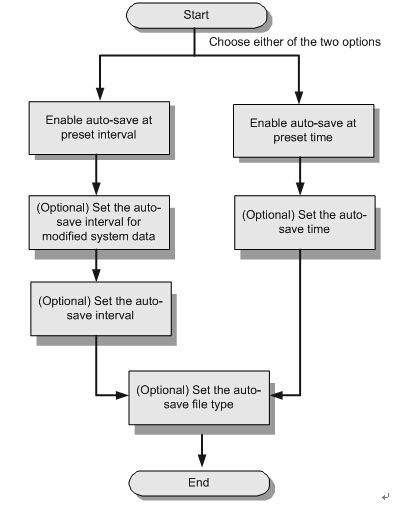
Figure 1 shows the flowchart for configuring the auto-save function.
Figure 1 Flowchart for configuring the auto-save function
7-17 ma5600
Procedure
  • Configure auto-save at preset interval.
    1. In the global config mode, run the autosave interval on command to enable auto-save at preset interval.
Auto-save at preset interval conflicts with auto-save at preset time. You can enable only one of them.
  1. (Optional) In the global config mode, run the autosave interval configuration command to set the auto-save interval for modified system data.
Auto-save is performed according to the interval set by the user. The system checks whether the system data is modified at each interval. If the system data is modified, the system saves the data. Otherwise, the system does not save the data. By default, the interval is 30 minutes.
  1. (Optional) In the global config mode, run the autosave interval command to set the auto-save interval.
After the setting, the system data is automatically saved at the set interval regardless of whether the system data is modified. By default, the interval is 24 hours.
  1. (Optional) Set the auto-save file type.
In the global config mode, run the autosave type command to set the auto-save file type.
  • Configure auto-save at preset time.
    1. In the global mode, run the autosave time on command to enable auto-save at preset time.
Auto-save at preset time conflicts with auto-save at preset interval. You can enable only one of them.
  1. (Optional) In the global config mode, run the autosave time command to set the auto-save time.
After the setting, the system data is automatically saved at the set time regardless of whether the system data is modified. By default, the time is 00:00:00.
  1. (Optional) Set the auto-save file type.
In the global config mode, run the autosave type command to set the auto-save file type.
Example
To enable auto-save at preset interval on the MA5600, set the auto-save interval to two days (2880 minutes), and save both the database file and the configuration file, do as follows:
huawei(config)#autosave interval on
huawei(config)#autosave interval 2880
huawei(config)#autosave type all
huawei(config)#save

More related:

How To Reset Huawei OLT MA5600T Series Equipment Password

Monday, February 29, 2016

MA5600T VS MA5603T VS MA5608T

Huawei MA5600T/MA5603T/MA5608T are multi-service access equipment, they support different service like GPON, xDSL, VOIP, etc, they can work as OLT and ONU, while MA5680T/MA5683T are purely OLT.

OLT MA5600T/ OLT MA5680TOLT MA5603T/ OLT MA5683TOLT MA5608T
Service SlotsIEC Chassis: 14 Slots
ETSI Chassis: 16 Slots
6 Slots2 Slots
Maximum number of GPON ports in a ChassisIEC Chassis: 224
ETSI Chassis: 256
9632
Maximum number of GPON Subscribers in a ChassisIEC Chassis: 28672
ETSI Chassis: 32768
122884096
Support Multiple ServiceMA5600T: Yes
MA5680T: No
MA5603T: Yes
MA5683T: No
Yes
WidthIEC Chassis: 19 Inch
ETSI Chassis: 21 Inch
19 Inch19 Inch
PowerDC OnlyDC OnlyAC or DC

Q: What is the difference between MA5683T and MA5603T?
A: MA5603T is multi service based while MA5683T is just OLT, MA5603T can support service like ADSL, VDSL, GPON etc, while MA5683T only supports GPON, P2P etc, but their hardware and configuration command is the same.

Q: What is the difference between MA5683T and MA5680T?
A: The only difference is capacity, MA5683T max support 6 service slots, MA5680T max support 16 service slots. So MA5683T with smaller chassis.

Q: What is the difference between MA5680T and MA5600T?
A: MA5600T is multi service based while MA5680T is just OLT, MA5600T can support service like ADSL, VDSL, GPON etc, while MA5680T only supports GPON, P2P etc, but their hardware and configuration command is the same.

Q: What is the difference between MA5600T and MA5603T?
A: The only difference is capacity, MA5600T max support 16 service slots, but MA5603T max support 6 service slots. So MA5603T with smaller chassis.

Q: What is the difference between MA5608T and other OLT?
A: MA5608T hardware is different from other OLT (MA5680T/MA5683T/MA5600T/MA5603T), such as main control board and power board, only the service board is the same as others, MA5608T suitable for small site.

The more information about the Huawei GPON FAQ, you can visit: www.thunder-link.com, a world leading Huawei networking products distributor, it always devotes to satisfying clients’ needs, is a platform for us to learn and share knowledge!

Thunder-link.com also can provide the networking solution for you according to you network. You can get the FTTx solution, xDSL solution, campus LAN/WAN solution here. If you are confused with the products Cisco and Huawei, you can also get the information: mapping relationship of Cisco switches and Huawei switches. A guide to your perfect understanding.

More related:

How To Reset Huawei OLT MA5600T Series Equipment Password