Showing posts with label Huawei HG8245A. Show all posts

Tuesday, March 1, 2016

Defrences between HG48245T and HG8245A

The EchoLife HG8245A, an optical network terminal (ONT), is a high-end home gateway in Huawei FTTH solution. By using the GPON technology, ultra-broadband access is provided for home and SOHO users. The HG8245A provides two POTS ports, four GE/FE auto-adapting Ethernet ports and one Wi-Fi port. The HG8245 features high-performance forwarding capabilities to ensure excellent experience with VoIP, Internet and HD video services. Therefore, the HG8245A provides a perfect terminal solution and future-oriented service supporting capabilities for FTTH deployment.

 HG8245A Features


Port: 2POTS+4FE+1USB+WiFi.
Plug-and-play (PnP): Internet, IPTV and VoIP services can be deployed by one click on the NMS and on-site configuration is not required.
Remote diagnosis: Remote fault locating is implemented by the loop-line test of POTS ports, call emulation and PPPoE dialup emulation initiated by the NMS.
Green energy-saving: 25% power consumption is saved with highly integrated system on chipset (SOC) solution, in which, a single chip integrates with PON, voice, gateway and LSW modules.
802.11b/g/n WLAN
H.248 and SIP VoIP
Support IPv6
IPoE or PPPoE Encapsulation mode
Support NAT
IP, MAC, URL Filter
Used to connect to USB storage device USB Port


Applications & Benefit
High-performance forwarding capability provides an optimal terminal solution and future oriented service supporting capabilities for FTTH deployment.
Plug-and-play makes service provisioning easier and more quickly.
Abundant remote diagnosis helps to locate failure more quickly and reduce OPEX.

HG8245T Features


GPON ONT, 4*GE+2*POTS+1*USB, with WiFi
Support IPv4 and IPv6
Support H.248 or SIP
Connector type SC/APC
With external antennal
Coming with B+ SFP Module
Can be configured by OLT or Web or NMS
HG8245T coming with English GUI
Suitable for home and SOHO users
Support 802.11n
Routing function supported
Huawei EchoLife HG8245T optical network terminal (ONT) is a high-end home gateway in Huawei FTTx solution. By using GPON technology, ultra-broadband access is provided for home and SOHO users. The HG8245T provides four GE Ethernet ports, two POTS ports and one USB Port, HG8245T has Wi-Fi function, support 802.11b/g/n.
specificationHG8245AHG8245T
Dimentions176mm*138.5mm*28mm195mm*155mm*34mm
weightabout 1kgabout 1kg
woriking environmentOperating temperature: 0ºC to 40ºCOperating temperature: 0ºC to 40ºC
Environment humidity: 5% to 95% (noncondensing)Environment humidity: 5% to 95% (noncondensing)
power consumptionStatic power: 7.45 W Maximum power consumption: 12 W10 W
power specificationsPower adapter input: 100 to 240 V AC, 50–60 HzPower adapter input: 100 to 240 V AC, 50–60 Hz
System power supply: 11–14 VDC, 1 ASystem power supply: 11–14 VDC, 2 A
WLAN802.11b/g/n802.11b/g/n
voIPH.248 and SIPH.248 or SIP
Support IPv6YesYes
Encapsulation modeIPoE or PPPoEIPoE or PPPoE
Support NATYesYes
SecurityIP FilterIP Filter
MAC FilterSMAC Filter
URL FilterURL Filter
USB portUsed to connect to USB storage deviceUsed to connect to USB storage device

Thursday, February 25, 2016

Huawei GPON ONT HG8245 FAQ

Q: What is the difference between HG8245 and HG8245A and HG8245T?
A: You can visit the below rink to know more...

Q: What is the difference between GPON HG8245 and ONT HG8240ONT HG8240F?
A: The main difference is HG8245 comes with WiFi, HG8240/HG8240F not.

Q: Do you have HG8245 with C+ Module?
A: No, we only have some HG8010H NOT with C+ module.

Q: Do you have 4*GE version HG8245?
A: No, there is only 4*FE version, actually the GPON speed 2.5Gbps after splitting, even just 1:32, average each user can only get 78Mbps, also on the customer side 100Mbps is enough for normal use. For certain customer who really need super high speed internet, you may consider to use HG8010H which has 1*GE, or in some commercial areas, using Huawei MDU, like MA5626, MA5612 which has multiple GE ports.

Q: Do you have documentation of HG8245?
A: Yes, you may contact Thunder-link sales person.

Q: My HG8245T is with SC/APC, Huanetowrk HG8245 is SC/UPC, do I have any problems?
A: No, it is going to be fine, just make sure you use the cable with SC/UPC connector, Thunder-link also offers SC/UPC connector.

Q: Do I need to have 2 cable for HG8245, one in one out?
A: No, one cable is enough, the GPON is using WDM technology, which only
require one cable.

Q: Can I use HG8245 with other brand OLT?
A: Thunder-link not suggest, as the understanding between different vendor on TR069/OMCI may different.

Q: Does HG8245 support routing function?
A: Yes.

Q: Does HG8245 support battery back?
A: No.
More related:

Situation When Carry 10GE Traffic On OSN3500

Be Ware of Software Watchdog Reset on the System Control Board of OptiX OSN Equipment

Wednesday, February 17, 2016

How to set up Wi-Fi on GPON Huawei HG8245

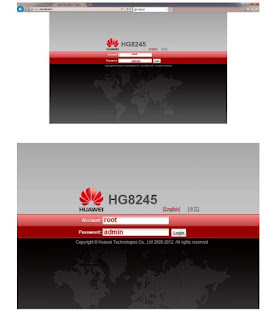
1. Connect Router by using IP 192.168.100.1
Account = root
Password = admin

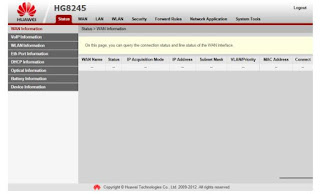
2. On the first page, select WLAN


3. Basic Configuration

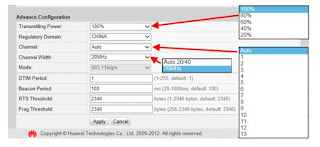
4. Advance Configuration

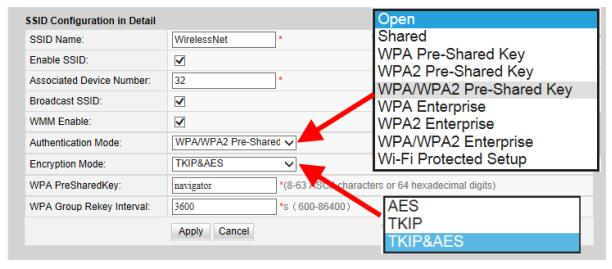
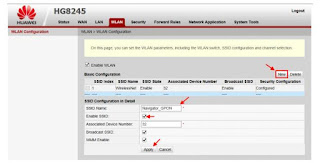
5. SSID can be created more than 1 SSID by clicking at “NEW” a. Enter SSID Name b. Place a check mark at Enable SSID c. Click Apply

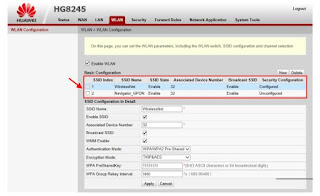
6. SSID parameters can be set

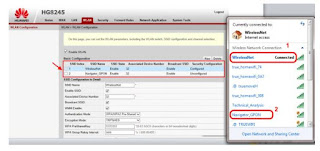
7. Test SSID signal on 2 AP which have been set

For more information on the HG8245 series optical modem, please visit Thunder-link.com or email to Supports@Thunder-link.com. We will provide you with the best technical support and service.