Easy Operation and Maintenance
Huawei S2700 supports Easy-Operation, which implements easy installation, configuration,
monitoring, and troubleshooting. This technology greatly reduces installation and
configuration costs and engineering costs, and improves upgrade efficiency. The S2700
provides the CLI and web platform, supports alarm management and visualized configuration,
and replacement of faulty devices.
The S2700 uses the ASIC chip and fanless design, which reduces mechanical faults and
protects the equipment against damages caused by condensed water and dusts.
Flexible Service Control
The S2700 supports various ACLs. ACL rules can be applied to VLANs to flexibly control
traffic on interfaces and schedule resources in VLANs.
The S2700 supports VLAN assignment based on interfaces, MAC addresses, protocols, and
IP subnets. It applies to networks where users move frequently and networks demanding high
security.
The S2700 supports GVRP, which dynamically distributes, registers, and propagates VLAN
attributes to reduce the manual configuration workloads of network administrators and ensure
correct VLAN configuration. In addition, Huawei S2700 supports SSHv2, HWTACACS, RMON,
interface-based traffic statistics, and NQA to help in network planning and upgrading.
Various Security Measures
The S2700 supports DHCP snooping, which generates user binding entries based on MAC
addresses, IP addresses, IP address leases, VLAN IDs, and interface numbers of users. The
DHCP snooping function protects networks against common attacks such as bogus IP packet
attacks, man-in-the-middle attacks, and bogus DHCP server attacks.
The S2700 can limit the number of MAC addresses learned on an interface to prevent packet
flooding that occurs when an attacker frequently changes source MAC addresses. The S2700
supports strict ARP learning. This feature prevents ARP spoofing attackers from exhausting
ARP entries so that users can connect to the Internet normally. It provides IP source check to
prevent DoS attacks caused by IP address spoofing.
The S2700 supports centralized MAC address authentication and 802.1x authentication. It
authenticates users based on static or dynamic user binding information such as the user
name, IP address, MAC address, VLAN ID, and interface number. VLANs and ACLs can be
applied to users dynamically.
Various Reliability Mechanisms
The S2700 supports iStack, which virtualizes multiple switches into one logical switch. iStack
improves the switching capacity and enhances reliability and scalability. The stacked switches
are managed using a single IP address, which greatly reduces system operation and
maintenance costs.
Besides STP, RSTP, and MSTP, the S2700 like S2700-28TP-EI also supports enhanced Ethernet reliability
technologies such as Smart Link and RRPP, which implement millisecond-level protection
switching and ensure network reliability.
The S2700 supports the Smart Ethernet Protection (SEP) protocol, which is a ring network
protocol applied to the link layer of an Ethernet network. SEP provides fast switchover within
several milliseconds without interrupting services. SEP features simplicity, high reliability,
high switchover performance, convenient maintenance, and flexible topology and enables
users to manage and plan networks conveniently.
The S2700 supports G.8032, also called Ethernet Ring Protection Switch (ERPS). ERPS is
based on traditional Ethernet MAC and bridging functions. It uses the mature Ethernet OAM
and Ring Automatic Protection Switching (Ring APS or R-APS) technologies to implement
fast protection switching on Ethernet. ERPS supports multiple services and provides flexible
networking, reducing the OPEX and CAPEX.
Showing posts with label S2700 Switch. Show all posts
Showing posts with label S2700 Switch. Show all posts
Monday, August 7, 2017

Monday, July 3, 2017
Does Huawei S2700 switch support PoE, and how much power?
Yes, some Huawei S2700 models can support PoE, for example S2700-26TP-PWR-EI and S2700-9TP-PWR-EI.
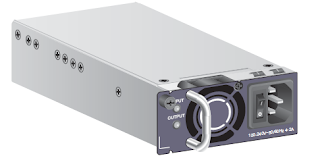

There are two kinds of PoE power modules:
1, W0PSA2500: 250 W AC PoE Power Module
Switch chassis matching a 250 W AC PoE power module:
Supported only in the S2700-26TP-PWR-EI, S2700-52P-PWR-EI, and S2710-52P-PWR-SI
Appearance

2, W0PSA5000: 500 W AC PoE Power Module
Supported only in the S2700-26TP-PWR-EI, S2700-52P-PWR-EI,
and S2710-52P-PWR-SI

Function:
PoE power supply
Input protection
Output protection
Overtemperature protection
Surge protection
Hot swap
Sunday, April 10, 2016
Creating a VLANIF Interface
Creating a VLANIF Interface
VLANIF interfaces are Layer 3 logical interfaces. After creating VLANIF interfaces on Layer 2 devices, you can configure Layer 3 features on these interfaces.
Establishing the Configuration Task
Before creating a VLANIF interface, familiarize yourself with the applicable environment, complete the pre-configuration tasks, and obtain the data required for the configuration. This will help you complete the configuration task quickly and accurately.
Applicable Environment
Layer 3 switching combines routing and switching techniques to implement routing on a switch, thus improving the overall network performance. After sending the first data flow, a Layer 3 switch generates mappings between MAC addresses and IP addresses. To send the same data flow, the switch directly sends the data flow at Layer 2 but not Layer 3 based on this mapping table.
To allow that new data flows are correctly forwarded based on the routing table, be sure that the routing table's routing entries are correct. Therefore, VLANIF interfaces and routing protocols must be configured on Layer 3 switches for reachable Layer 3 routes.
Pre-configuration Tasks
Before creating a VLANIF interface, complete the following task:
· Creating a VLAN
Data Preparation
To create a VLANIF interface, you need to the following data.
Data
| |
1
|
VLAN ID
|
2
|
IP address to be assigned to the VLANIF interface
|
3
|
(Optional) Delay after which the VLANIF interface goes Down
|
4
|
(Optional) MTU of the VLANIF interface
|
Creating a VLANIF Interface
Before configure Layer 3 features on a Layer 2 device, you must create a VLANIF interface on the device.
Procedure
1. Run:
system-view
The system view is displayed.
2. Run:
interface vlanif vlan-id
A VLANIF interface is created and the VLAIF interface view is displayed.
The VLAN ID specified in this command must be the ID of an existing VLAN.
 NOTE:
NOTE:
A VLANIF interface is Up only when at least one physical port added to the corresponding VLAN is Up.
Parent
Assigning an IP Address to a VLANIF Interface
As a VLANIF interface is a Layer 3 logical interface, it can communicate with other interfaces at the network layer only after being assigned an IP address.
Procedure
1. Run:
system-view
The system view is displayed.
2. Run:
interface vlanif vlan-id
The VLANIF interface view is displayed.
The VLAN ID specified in this command must be the ID of an existing VLAN.
3. Run:
ip address ip-address { mask | mask-length } [ sub ]
An IP address is assigned to the VLANIF interface for communication at the network layer.
Checking the Configuration
After a VLANIF interface is configured for communication at the network layer, you can check the IP address and status of a specified VLANIF interface.
Prerequisites
The configurations of a VLANIF interface are complete.
Procedure
· Run the display interface vlanif [ vlan-id ] command to check the physical status, link protocol status, description, and IP address of the VLANIF interface.
Huawei networking equipments, including Huawei switches(S2300 switch,S2700 switch,S3300 switch,S3700 switch,S5700 switch), Huawei routers, Huawei symantec security
products, Huawei IAD, Huawei SFP and other Huawei networking products. Our customers include telecom
operators, Huawei resellers, ISP and system integrators. If you have such requirement please contact
your sales person, if you are new customer, please feel free to contact Sales@Thunder-Link.com. Our
HCIE headed technical team can provide network design, products installation and configuration,
trouble shooting etc.
The most popular Huawei S2700EI switch as below:
LS-S2700-9TP-SI-AC
LS-S2751-28TP-PWR-EI-AC
Telephone: 852-30623083
Email: Sales@Thunder-Link.com
Website: http://www.thunder-link.com
Thursday, April 7, 2016
The Function of Huawei S2700EI Series Switches
The Huawei S2700EI series switch is next-generation energy-saving 100M Ethernet intelligent switches - is deployed at the access layer of a campus network to provide high performance, multi-service, and highly reliable enterprise network.

Huawei S2700EI Series Switches Characteristics:
PoE
The S2700EI PWR provides improved PoE solutions. You can configure whether and when a PoE port supplies power. The S2700EI PWR can use PoE power supplies with different power levels to provide -48V DC power for powered devices (PDs), such as IP phones, WLAN APs, and Bluetooth APs. As the power sourcing equipment (PSE), the S2700EI PWR complies with IEEE 802.3af and 802.3at (PoE+) and can supply power to non-standard PDs. PoE ports can work in power-saving mode. Each 802.3at-enabled interface can provide 30 W power, so the S2700EI can connect to high-power terminals.
Various Reliability Mechanisms
The S2700EI supports iStack, which virtualizes multiple switches into one logical switch. iStack improves the switching capacity and enhances reliability and scalability. The stacked switches are managed using a single IP address, which greatly reduces system operation and maintenance costs.
Besides STP, RSTP, and MSTP, the S2700EI also supports enhanced Ethernet reliability technologies such as Smart Link and RRPP, which implement millisecond-level protection switching and ensure network reliability.
The S2700EI supports the Smart Ethernet Protection (SEP) protocol, which is a ring network protocol applied to the link layer of an Ethernet network. SEP provides fast switchover within several milliseconds without interrupting services. SEP features simplicity, high reliability, high switchover performance, convenient maintenance, and flexible topology and enables users to manage and plan networks conveniently.
The S2700EI supports G.8032, also called Ethernet Ring Protection Switch (ERPS). ERPS is based on traditional Ethernet MAC and bridging functions. It uses the mature Ethernet OAM and Ring Automatic Protection Switching (Ring APS or R-APS) technologies to implement fast protection switching on Ethernet. ERPS supports multiple services and provides flexible networking, reducing the OPEX and CAPEX.
Flexible Service Control
The S2700EI supports various ACLs. ACL rules can be applied to VLANs to flexibly control traffic on interfaces and schedule resources in VLANs.
The S2700EI supports VLAN assignment based on interfaces, MAC addresses, protocols, and IP subnets. It applies to networks where users move frequently and networks demanding high security.
The S2700EI supports GVRP, which dynamically distributes, registers, and propagates VLAN attributes to reduce the manual configuration workloads of network administrators and ensure correct VLAN configuration. In addition, the S2700EI supports SSHv2, HWTACACS, RMON, interface-based traffic statistics, and NQA to help in network planning and upgrading.
Various Security Measures
The S2700EI supports DHCP snooping, which generates user binding entries based on MAC addresses, IP addresses, IP address leases, VLAN IDs, and interface numbers of users. The DHCP snooping function protects networks against common attacks such as bogus IP packet attacks, man-in-the-middle attacks, and bogus DHCP server attacks.
The S2700EI can limit the number of MAC addresses learned on an interface to prevent packet flooding that occurs when an attacker frequently changes source MAC addresses.
The S2700EI supports strict ARP learning. This feature prevents ARP spoofing attackers from exhausting ARP entries so that users can connect to the Internet normally. It provides IP source check to prevent DoS attacks caused by IP address spoofing.
The S2700EI supports centralized MAC address authentication and 802.1x authentication. It authenticates users based on static or dynamic user binding information such as the user name, IP address, MAC address, VLAN ID, and interface number. VLANs and ACLs can be applied to users dynamically.
Comprehensive QoS Policies
The S2700EI supports complex traffic classification based on VLAN IDs, MAC addresses, IP protocols, source addresses, destination addresses, priorities, or TCP or UDP port numbers of packets. By limiting the traffic rate based on flows, the S2700EI implements line-speed forwarding on each interface to ensure high quality of the voice, video, and data services. Each interface supports eight queues and multiple queue scheduling algorithms such as WRR, SP, and WRR+SP.
Powerful Surge Protection Capability
The S2700 adopts a Huawei patented surge protection technique to prevent lightning induced overvoltage. All interfaces of the S2700 have a surge protection capability of 6 kV. The Huawei patented surge protection technique greatly reduces the possibility of lightning damages on the equipment even in atrocious environments or in scenarios where grounding cannot be implemented.
The most popular Huawei S2700EI switch as below:
LS-S2700-9TP-SI-AC
LS-S2751-28TP-PWR-EI-AC
Telephone: 852-30623083
Email: Sales@Thunder-Link.com
Website: http://www.thunder-link.com
Tuesday, March 15, 2016
The Function of Huawei S2700EI Series Switches
The Huawei S2700EI series switch is next-generation energy-saving 100M Ethernet intelligent switches - is deployed at the access layer of a campus network to provide high performance, multi-service, and highly reliable enterprise network.
Different VLAN with the same IP address segment communicate through the layer three switches
MA5600T Series Maintenance Feature Glance
MA5600T&MA5603T&MA5608T 10G GPON Feature Glance
How to Configure the H.248-based Voice Service?
How to Login Huawei Equipment Through the Local Serial Port
Huawei S2700EI Series Switches Characteristics:
PoE
The S2700EI PWR provides improved PoE solutions. You can configure whether and when a PoE port supplies power. The S2700EI PWR can use PoE power supplies with different power levels to provide -48V DC power for powered devices (PDs), such as IP phones, WLAN APs, and Bluetooth APs. As the power sourcing equipment (PSE), the S2700EI PWR complies with IEEE 802.3af and 802.3at (PoE+) and can supply power to non-standard PDs. PoE ports can work in power-saving mode. Each 802.3at-enabled interface can provide 30 W power, so the S2700EI can connect to high-power terminals.
Various Reliability Mechanisms
The S2700EI supports iStack, which virtualizes multiple switches into one logical switch. iStack improves the switching capacity and enhances reliability and scalability. The stacked switches are managed using a single IP address, which greatly reduces system operation and maintenance costs.
Besides STP, RSTP, and MSTP, the S2700EI also supports enhanced Ethernet reliability technologies such as Smart Link and RRPP, which implement millisecond-level protection switching and ensure network reliability.
The S2700EI supports the Smart Ethernet Protection (SEP) protocol, which is a ring network protocol applied to the link layer of an Ethernet network. SEP provides fast switchover within several milliseconds without interrupting services. SEP features simplicity, high reliability, high switchover performance, convenient maintenance, and flexible topology and enables users to manage and plan networks conveniently.
The S2700EI supports G.8032, also called Ethernet Ring Protection Switch (ERPS). ERPS is based on traditional Ethernet MAC and bridging functions. It uses the mature Ethernet OAM and Ring Automatic Protection Switching (Ring APS or R-APS) technologies to implement fast protection switching on Ethernet. ERPS supports multiple services and provides flexible networking, reducing the OPEX and CAPEX.
Flexible Service Control
The S2700EI supports various ACLs. ACL rules can be applied to VLANs to flexibly control traffic on interfaces and schedule resources in VLANs.
The S2700EI supports VLAN assignment based on interfaces, MAC addresses, protocols, and IP subnets. It applies to networks where users move frequently and networks demanding high security.
The S2700EI supports GVRP, which dynamically distributes, registers, and propagates VLAN attributes to reduce the manual configuration workloads of network administrators and ensure correct VLAN configuration. In addition, the S2700EI supports SSHv2, HWTACACS, RMON, interface-based traffic statistics, and NQA to help in network planning and upgrading.
Various Security Measures
The S2700EI supports DHCP snooping, which generates user binding entries based on MAC addresses, IP addresses, IP address leases, VLAN IDs, and interface numbers of users. The DHCP snooping function protects networks against common attacks such as bogus IP packet attacks, man-in-the-middle attacks, and bogus DHCP server attacks.
The S2700EI can limit the number of MAC addresses learned on an interface to prevent packet flooding that occurs when an attacker frequently changes source MAC addresses.
The S2700EI supports strict ARP learning. This feature prevents ARP spoofing attackers from exhausting ARP entries so that users can connect to the Internet normally. It provides IP source check to prevent DoS attacks caused by IP address spoofing.
The S2700EI supports centralized MAC address authentication and 802.1x authentication. It authenticates users based on static or dynamic user binding information such as the user name, IP address, MAC address, VLAN ID, and interface number. VLANs and ACLs can be applied to users dynamically.
Comprehensive QoS Policies
The S2700EI supports complex traffic classification based on VLAN IDs, MAC addresses, IP protocols, source addresses, destination addresses, priorities, or TCP or UDP port numbers of packets. By limiting the traffic rate based on flows, the S2700EI implements line-speed forwarding on each interface to ensure high quality of the voice, video, and data services. Each interface supports eight queues and multiple queue scheduling algorithms such as WRR, SP, and WRR+SP.
Powerful Surge Protection Capability
The S2700 adopts a Huawei patented surge protection technique to prevent lightning induced overvoltage. All interfaces of the S2700 have a surge protection capability of 6 kV. The Huawei patented surge protection technique greatly reduces the possibility of lightning damages on the equipment even in atrocious environments or in scenarios where grounding cannot be implemented.
The most popular Huawei S2700EI switch as below:
Telephone: 852-30623083
Email: Sales@Thunder-Link.com
Website: http://www.thunder-link.com
More related:
Different VLAN with the same IP address segment communicate through the layer three switches
MA5600T Series Maintenance Feature Glance
MA5600T&MA5603T&MA5608T 10G GPON Feature Glance
How to Configure the H.248-based Voice Service?
How to Login Huawei Equipment Through the Local Serial Port
Monday, March 14, 2016
Configuring an SNMP Query Test Instance on Huawei Switch
How to Configure an SNMP Query Test Instance on Huawei Switch
Context
Before configuring an SNMP query test instance, configure an SNMP agent and ensue reachable routes between the NQA client and the SNMP agent.
You can obtain the statistics about communication between the NQA client and the SNMP agent.
Perform the following steps on the NQA client.
The configuration overview:
Step 1 Run:
system-view
The system view is displayed.
Step 2 Run:
nqa test-instance admin-name test-name
An NQA test instance is created, and the NQA view is displayed.
Step 3 Run:
test-type snmp
The test type is set to SNMP.
Step 4 Run:
destination-address ipv4 ipv4-address
The destination IP address (IP address of the SNMP agent) is configured.
The SNMP function must be enabled on the destination host, otherwise, the NQA client cannot receive response packets.
Step 5 (Optional) Run the following commands as required to configure parameters for the SNMP test.
Run:
description string
A description is configured for the test instance.
Run:
frequency interval
The test period is set for the NQA test instance.
Run:
timeout time
The timeout period of a probe is set for the NQA test instance.
Run:
source-address ipv4 ipv4-address
The source IP address is configured.
Run:
source-port port-number
The source port number is configured.
Run:
ttl number
The TTL value in the NQA test packet is set.
Run:
sendpacket passroute
The NQA test instance is configured to send packets without searching the routing table.
Run:
probe-count number
The number of probes in a test is set.
Run:
tos value
Type of Service (ToS) is set for the test packet.
Run:
fail-percent percent
The failure percentage is set for the NQA test instance.
Run:
interval seconds interval
The interval at which test packets are sent is configured.
Run:
vpn-instance vpn-instance-name
The VPN instance name is configured.
Run:
records history number
The maximum number of historical records is set for the NQA test instance.
Run:
records result number
The maximum number of result records is set for the NQA test instance.
Run:
agetime hh:mm:ss
The aging time is set for the NQA test instance.
—-End
Note: this configuration also works for the Huawei s2700, Quidway S5700, s6700, Huawei S3700.
Telephone: 852-30623083
Email: Sales@Thunder-Link.com
Website: http://www.thunder-link.com
Monday, March 7, 2016
Working Temperature of the Huawei Switches
Huawei S2700
The temperature range of the S2700 is as follows:
Operating temperature:
Huawei S3700
The temperature range of the S3700-SI and S3700-EI is as follows:
NOTE:
When the altitude is between 1800 m and 5000 m, the operating temperature reduces 1°C every time the altitude increases 220 m.
Huawei S5700
The temperature range of the S5710-LI, S5700-SI and S5700-EI is as follows:
Operating temperature:
The temperature range of the S5700-HI is as follows:
NOTE:
The temperature range of the S6700 is as follows:
NOTE:
When the S6700 has the 40 km SFP+ module installed, the operating temperature range is -5°C to +45°C.
Temperature Display
The display environment command (changed into display temperature in V200R005 and later versions) displays the monitoring temperature, which is the highest temperature in the device but not the actual ambient temperature.
If no alarm is generated, the device is working normally and the temperature is within the allowed range.
NOTE:
You can run the temperature threshold command to set the threshold for the alarm temperature. You can run the display environment command (changed into display temperature in V200R005 and later versions) to view the threshold for the alarm temperature and the current temperature.
As a world leading Huawei networking products supplier, Thunder-link wholesales original new Huawei networking equipments, including Huawei switches, Huawei routers, Huawei symantec security products, Huawei IAD, Huawei SFP and other Huawei networking products. Our customers include telecom operators, Huawei resellers, ISP and system integrators. If you’d like to see the benefits of Huawei products for yourself, you can log into http://www.thunder-link.com, or you can contact our Sales@Thunder-Link.com to get more information on Cisco Networks solutions.
More blog:
Huawei Low-end Switches Boot Upgrade For BOOTROM
Huawei Low-end Switches Upgrade The APP System
Cisco-Router-IOS Configuration Backup And Recovery
Optical attenuation is too large lead to ONU recovery failure
The temperature range of the S2700 is as follows:
Operating temperature:
- S2710-52P-PWR-SI and S2700-52P-PWR-EI: 0°C to +50°C
- Others: -5°C to +50°C
Huawei S3700
The temperature range of the S3700-SI and S3700-EI is as follows:
- Operating temperature: 0°C to +50°C
- Storage temperature: -40°C to +70°C
- Operating temperature: -5°C to +55°C (altitude 0 to 1800 m)
- Storage temperature: -40°C to +70°C
NOTE:
When the altitude is between 1800 m and 5000 m, the operating temperature reduces 1°C every time the altitude increases 220 m.
Huawei S5700
The temperature range of the S5710-LI, S5700-SI and S5700-EI is as follows:
- Operating temperature: 0°C to +50°C
- Storage temperature: -40°C to +70°C
Operating temperature:
- The operating temperature of the S5700-10P-PWR-LI-AC, S5700-28X-LI-24S-AC, S5700-28X-LI-24S-DC, S5701-28X-LI-24S-AC, S5700-52X-LI-48CS-AC, and S5700-10P-LI-AC is 0°C to +45°C at an altitude between 0 m and 1800 m.
- Others: 0°C to +50°C (altitude 0 to 1800 m)
The temperature range of the S5700-HI is as follows:
- Operating temperature: -5°C to +55°C
- Storage temperature: -40°C to +70°C
- Operating temperature: 0°C to +45°C (altitude 0 to 1800 m)
- Storage temperature: -40°C to +70°C
NOTE:
- When the S5700-HI has the 40 km SFP+ module installed, the operating temperature range is -5°C to +50°C.
- When the altitude is between 1800 m and 5000 m, the operating temperature reduces 1°C every time the altitude increases 220 m.
The temperature range of the S6700 is as follows:
- Operating temperature: -5°C to +50°C
- Storage temperature: -40°C to +70°C
NOTE:
When the S6700 has the 40 km SFP+ module installed, the operating temperature range is -5°C to +45°C.
Temperature Display
The display environment command (changed into display temperature in V200R005 and later versions) displays the monitoring temperature, which is the highest temperature in the device but not the actual ambient temperature.
If no alarm is generated, the device is working normally and the temperature is within the allowed range.
NOTE:
You can run the temperature threshold command to set the threshold for the alarm temperature. You can run the display environment command (changed into display temperature in V200R005 and later versions) to view the threshold for the alarm temperature and the current temperature.
As a world leading Huawei networking products supplier, Thunder-link wholesales original new Huawei networking equipments, including Huawei switches, Huawei routers, Huawei symantec security products, Huawei IAD, Huawei SFP and other Huawei networking products. Our customers include telecom operators, Huawei resellers, ISP and system integrators. If you’d like to see the benefits of Huawei products for yourself, you can log into http://www.thunder-link.com, or you can contact our Sales@Thunder-Link.com to get more information on Cisco Networks solutions.
More blog:
Huawei Low-end Switches Boot Upgrade For BOOTROM
Huawei Low-end Switches Upgrade The APP System
Cisco-Router-IOS Configuration Backup And Recovery
Optical attenuation is too large lead to ONU recovery failure
Subscribe to:
Posts (Atom)