Showing posts with label OSN 6800. Show all posts

Thursday, March 31, 2016

Management Interfaces and Connections of OptiX OSN 8800/6800A

Interfaces
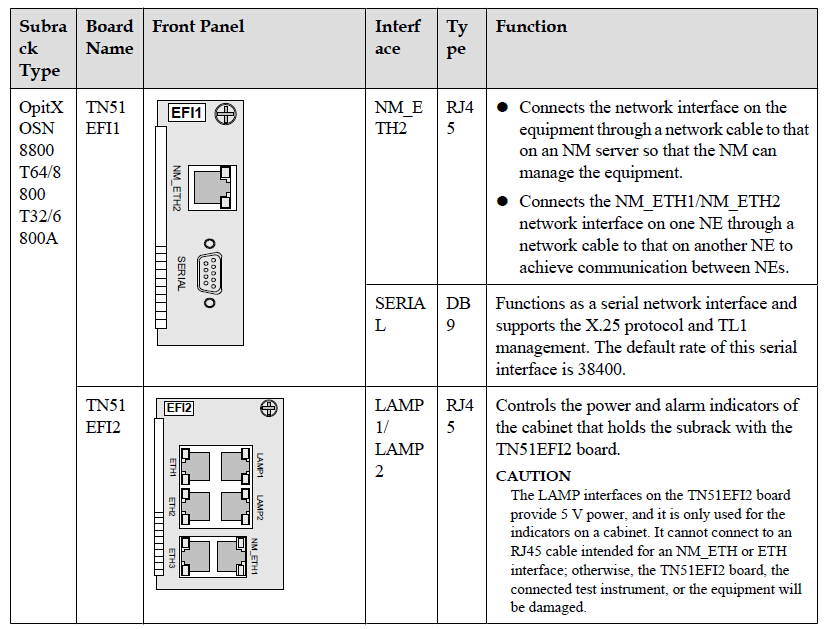
For OptiX OSN 8800/OptiX OSN 6800A, the NM_ETH1/NM_ETH2 interfaces on the
TN51ETH1/TN51ETH2/TN16EFI boards are used for achieving inter-NE communication. TheETH1, ETH2, and ETH3 interfaces on the TN51ETH2/TN16EFI boards are used to achieveintra-NE communication.Table 1 provides the correct connections of these networkinterfaces.
Table 1 Network cable interfaces
6-12 6800 11
6-12 6800 12
6-12 6800 13
6-12 6800 14
Connections
On a network where only OptiX OSN 8800 or OptiX OSN 6800A NEs are used, intra-NE and inter-NE communication are achieved through fiber connections and network cable connections.
NE Connections
Figure 1 and Figure 2 show the NE connection scheme. The figure presents connections
between two NEs: NE1 and NE2. Each NE consists of three subracks, one of which is the master subrack and the other two are slave subracks. The master and slave subracks are connected using fibers and network cables.
OptiX OSN 8800/6800A/3800A Installing, Operating and Maintaining Your Network(For
Field Engineer) 3 Quick View of Product Issue 02 (2013-10-30) Huawei Proprietary and Confidential Copyright © Huawei Technologies Co., Ltd. 314

Figure 1 NE connection scheme (OptiX OSN 8800 T32/8800 T64/6800A)
6-12 6800 15
Figure 2 NE connection scheme (OptiX OSN 8800 T16)
6-12 6800 16

Inter-NE communication:
l As shown in the figure above, NE1 connects to the NMS through the NM_ETH1 interface
on the EFI2/EFI board in the master subrack using a network cable, enabling the NMS to
manage the two NEs.
l Inside each NE, OTU, OADM/OA/OM/OD, OSC, and FIU boards are properly connected
through fibers. The FIU boards are also connected to other NEs. ESC or OSC channels are used to achieve inter-NE communication.
l The NM_ETH2 interface on the EFI1/EFI board in the master subrack of one NE is
connected to the NM_ETH1 interface on the EFI2/EFI board inside the master subrack of
the other NE using a network cable, achieving inter-NE communication over Ethernet
channels.
Intra-NE communication:
For each NE, the ETH2 and ETH3 interfaces on the EFI2/EFI board inside the master subrack are connected to the ETH1 interfaces on the EFI2/EFI boards in the slave subracks to achieve communication between the subracks.

Management Connections among OSN8800&6800A&3800A
On a hybrid network where OptiX OSN 8800, 6800A, and 3800A NEs are used, the inter-NE communication and intra-NE communication are achieved through fiber connections and network cable connections.
Connections
Figure 3 shows the NE connection scheme. The figure illustrates how three NEs (namely
NE1, NE2, and NE3) of different types are connected. As shown in the figure, NE1 consists of a master subrack (OptiX OSN 8800) and two slave subracks (OptiX OSN 8800 T16/6800A); NE2 and NE3 are two OptiX OSN 3800A NEs.
Figure 3 NE connection scheme
6-12 6800 17
Inter-NE communication:
l As shown in the figure above, NE1 connects to the NMS through the NM_ETH1 interface
on the EFI2 board in the master subrack using a network cable, enabling the NMS to manage all the NEs.
l The OTU, OADM/OA/OM/OD, OSC, and FIU boards inside NE1 are connected through
fibers. The FIU boards are also connected to other NEs. ESC or OSC channels are used to achieve inter-NE communication.
l NE2 and NE3 are connected through their OTU, OADM/OA, OSC, and FIU boards using
fibers. The FIU boards of the two NEs are also connected to other NEs. ESC or OSC
channels are used to achieve inter-NE communication.
l The NM_ETH2 interface on the EFI1 board of the master subrack inside NE1 connects to
the NM_ETH1 interface on the AUX board inside NE2 through a network cable. The
NM_ETH2 interface on the AUX board inside NE2 also uses a network cable to connect
to the NM_ETH1 interface on the AUX board inside NE3. In this manner, all the NEs
communicate with each other using Ethernet channels.
Intra-NE communication:
For NE1, the ETH2 and ETH3 interfaces on the EFI2 board inside the master subrack are
connected to the ETH1 interfaces on the EFI2/EFI boards in the slave subracks to achieve
communication between the subracks.

Telephone: 852-30623083
           Supports@Thunder-link.com            

Tuesday, March 8, 2016

OptiX OSN 8800 Tributary SNCP Defect on TN54THA and TN53TSXL

Summary: The NE software V100R008C10SPC200 does not support hardware tributary subnetwork connection 
protection (SNCP) on the TN54THA and TN53TSXL boards. To be specific, a TN54THA or TN53TSXL board equipped 
with hardware tributary SNCP will insert an incorrect s-code to the cross-connect board on the NE. As a result, the 
cross-connect board will report a HARD_BAD alarm, affecting services on the NE.
Product Line: Transport network product line                             Product Family: WDM products
Product Model: OptiX OSN 8800 V1R008C10SPC200
[Problem Description]
Trigger conditions:
The NE software version is V100R008C10SPC200.
Hardware tributary SNCP has been configured on RX/TX ports 9–16 of a TN54THA board or the RX/TX port of a TN53TSXL board on the NE. 
Hardware tributary SNCP is newly configured on RX/TX ports 9–16 of a TN54THA board or the RX/TX port of a TN53TSXL board on the NE. 
The cross-connect board on the NE is TN16UXCM, TN52UXCH, TN52UXCM, TNK2USXH, or TNK2UXCT. 
During NE expansion, the cross-connect boards on the NE are upgraded from TN16XCH, TN52XCH, TN52XCH02, TNK2SXH, TNK2XCT, TNK4SXM, 
TNK4SXM, or TNK4XCT to TN16UXCM, TN52UXCH, TN52UXCM, TNK2USXH, or TNK2UXCT. 
When conditions 1, 2, and 5, or conditions 1, 3, and 4 are met, the NE will report a HARD_BAD alarm.
Symptom:
The NE reports a HARD_BAD alarm and services on the NE are affected.
Identification method:
Conditions 1, 2, and 5, or conditions 1, 3, and 4 are met, and the NE reports a HARD_BAD alarm. The alarm parameters 
are as follows: 0xf,0x5,0xa,0xff,0xff,0xff.

[Root Cause]
The OptiX OSN 8800 V100R008C10SPC200 does not support hardware tributary SNCP on the TN54THA and TN53TSXL boards. 
If hardware tributary SNCP is configured on a TN54THA or TN53TSXL board, array violation will occur on the board, causing the 
board to insert an incorrect s-code to the cross-connect board on the NE. As a result, bit changes occur on the chip page of the 
cross-connect board. Consequently, the cross-connect board reports a HARD_BAD alarm. 

[Impact and Risk]
The network expansion is affected. When common cross-connect boards are upgraded to U-series cross-connect boards, the HARD_BAD alarm will be reported, and the tributary SNCP services on the TN54THA or TN53TSXL boards will 
be interrupted.
If U-series cross-connect boards are already used, the HARD_BAD alarm will be reported when tributary SNCP services are created. As a result, the 
new services cannot be provisioned but the existing services are not affected. 
The existing tributary SNCP services are not affected in non-expansion scenarios.
[Measures and Solutions]
Recovery measures:
In expansion scenarios, use the NE software V100R008C10SPC300 instead of V100R008C10SPC200. 
If tributary SNCP services fail to be created on the NE software V100R008C10SPC200, upgrade the NE software version to 
V100R008C10SPC300 or later.
Workarounds:
If tributary SNCP services are configured for the TN54THA or TN53TSXL board on an NE, use NE software V100R008C10SPC300 or 
later instead of V100R008C10SPC200. 
Preventive measures:
If tributary SNCP services are configured for the TN54THA or TN53TSXL board on an NE, use NE software V100R008C10SPC300 or 
later before capacity expansion.

Telephone: 852-30623083
           Supports@Thunder-link.com            

Wednesday, February 17, 2016

Huawei Launches the World’s First Fully Outdoor WDM Product

Carrying LTE/LTE-A CPRI services and helping to drive down network costs, making baseband unit cloud a reality
Huawei released the world’s first fully outdoor Wavelength-division multiplexing (WDM) product at a TDC and Huawei joint global WDM/OTN seminar themed ‘Simplified Network for a Better Experience’. Used for carrying LTE/LTE-A common public radio interface (CPRI) services, the product helps drive down the costs of network deployment and operations and maintenance, realizing the baseband unit cloud (BBU Cloud).
In order to reduce site leasing fees and centrally manage base station resources, carriers are beginning to adopt the BBU Cloud as the mainstream networking mode. To date, the baseband units (BBUs) have been collectively deployed in the integrated central office, and remote radio units deployed at the coverage points. The BBUs then work with the remote radio units through CPRIs to extend the service transmission distance. Usually, the CPRI services are transmitted through connected optical fibers. This type of networking mode consumes optical fiber resources and has low reliability. In addition, there are no supervisory measures for managing fibers, making maintenance difficult.
The fully outdoor Huawei WDM product replaces optical fiber connections with WDM technology. This results in a pair of optical fibers able to withstand more than 100 pairs of CPRI services. Also, the Huawei product reduces network investment and shortens service deployment time, providing a highly reliable network by using a unique delay compensation technology. The product also supports remote performance monitoring and uses a network management system to precisely locate faults. To ensure it is suitable for outdoor use it has a compatible design, supporting 614 Mbit/s to 9.8 Gbit/s (CPRI1-CPRI7) service on the client side. This specific design provides a product suitable for covering high-density and large-capacity metropolitan areas.
Huawei WDM/OTN series end-to-end intelligent optical transport platforms are applicable to the backbone core layer, metropolitan core layer, metropolitan aggregation layer, and metropolitan edge access layer. Thunder-link.com wholesales Huawei WDM products, include Huawei OSN 6800, Huawei OSN 8800. Get the best price Huawei WDM products from Thunder-link.com, ships to worldwide.
As world famous Huawei product supplier – Thunder-link.com, focuses on Huawei products and solutions, we are very experienced in this area. Most Huawei products are complicated, technical support may required at any phase of project, work with a professional supplier like Thunder-link will make your project secured.
It’s referenced from:
http://pr.huawei.com/en/news/hw-427431-cpri.htm#.VUw29iKUcUg